I just read this blog about performance considerations in MOSS 2007. Especially the section about SPList object is worth reading in detail.
Using the List.Items.Count should be avoided at any costs. It basically send a very complex and expensive SQL query, especially on large lists. If you need statistics use the List.ItemCount instead which uses the statistics information from SQL Server about the list to provide data. No absolutely correct though.
Friday, April 03, 2009

Wednesday, March 04, 2009
Wednesday, February 11, 2009
Very large document libraries - very strange SQL
If you ever come across the following SQL statement you need to take a critical look at various web parts other SharePoint related code recently deployed at your site.
SELECT TOP 2147483648 t2.[tp_Created] AS c3c8,t1.[Type] AS c0,t3.[tp_ID] AS c10c5,UserData.[nvarchar10],t1.[Id] AS c15,t4.[tp_Created] AS c17c8,UserData.[tp_ItemOrder],UserData.[tp_ModerationStatus],UserData.[nvarchar1],UserData.[nvarchar6],UserData.[bit2],UserData.[tp_Created],t1.[CheckinComment] AS c23,UserData.[tp_WorkflowInstanceID],t2.[nvarchar4] AS c3c6,t3.[tp_Created] AS c10c8,UserData.[ntext1],t4.[nvarchar4] AS c17c6,t1.[DirName] AS c18,UserData.[tp_ID],t1.[ProgId] AS c13,UserData.[nvarchar5],UserData.[bit1],t1.[Size] AS c21,UserData.[tp_GUID],t1.[TimeCreated] AS c1,UserData.[tp_Editor],UserData.[tp_Author],t2.[nvarchar1] AS c3c4,t3.[nvarchar4] AS c10c6,UserData.[nvarchar2],UserData.[nvarchar7],UserData.[nvarchar13],UserData.[tp_ContentType],t1.[LTCheckoutUserId] AS c20,t1.[TimeLastModified] AS c9,CASE WHEN DATALENGTH(t1.DirName) = 0 THEN t1.LeafName WHEN DATALENGTH(t1.LeafName) = 0 THEN t1.DirName ELSE t1.DirName + N'/' + t1.LeafName END AS c11,t1.[ScopeId] AS c16,UserData.[tp_ContentTypeId],UserData.[sql_variant1],t4.[nvarchar1] AS c17c4,UserData.[tp_WorkflowVersion],t1.[ParentVersionString] AS c24,UserData.[nvarchar4],UserData.[tp_CheckoutUserId],UserData.[tp_Version],UserData.[nvarchar9],t5.[nvarchar1] AS c4,UserData.[tp_IsCurrentVersion],t2.[nvarchar5] AS c3c7,t3.[nvarchar1] AS c10c4,UserData.[tp_HasCopyDestinations],UserData.[tp_Level],UserData.[nvarchar12],t1.[MetaInfo] AS c14,t4.[nvarchar5] AS c17c7,t1.[Size] AS c19,t1.[LeafName] AS c2,UserData.[tp_Modified],UserData.[nvarchar3],UserData.[nvarchar8],UserData.[tp_UIVersion],t2.[tp_ID] AS c3c5,t3.[nvarchar5] AS c10c7,UserData.[tp_CopySource],UserData.[nvarchar11],UserData.[tp_InstanceID],t1.[IsCheckoutToLocal] AS c12,t4.[tp_ID] AS c17c5,UserData.[tp_UIVersionString],t1.[ParentLeafName] AS c25 FROM UserData INNER MERGE JOIN Docs AS t1 WITH(NOLOCK) ON ( 1 = 1 AND UserData.[tp_RowOrdinal] = 0 AND t1.SiteId = UserData.tp_SiteId AND t1.SiteId = @L2 AND t1.DirName = UserData.tp_DirName AND t1.LeafName = UserData.tp_LeafName AND t1.Level = UserData.tp_Level AND (UserData.tp_Level = 255 AND t1.LTCheckoutUserId =@IU OR (UserData.tp_Level = 1 AND (UserData.tp_DraftOwnerId IS NULL OR (UserData.tp_DraftOwnerId <>@IU AND 1=0 )) OR UserData.tp_Level = 2 AND (UserData.tp_DraftOwnerId = @IU OR 1=1 )) AND (t1.LTCheckoutUserId IS NULL OR t1.LTCheckoutUserId <> @IU )) AND (1 = 1)) LEFT OUTER JOIN AllUserData AS t2 WITH(NOLOCK, INDEX=AllUserData_PK) ON (UserData.[tp_Editor]=t2.[tp_ID] AND UserData.[tp_RowOrdinal] = 0 AND t2.[tp_RowOrdinal] = 0 AND ( (t2.tp_IsCurrent = 1) ) AND t2.[tp_CalculatedVersion] = 0 AND t2.[tp_DeleteTransactionId] = 0x AND t2.tp_ListId = @L3 AND UserData.tp_ListId = @L4) LEFT OUTER JOIN AllUserData AS t3 WITH(NOLOCK, INDEX=AllUserData_PK) ON (UserData.[tp_CheckoutUserId]=t3.[tp_ID] AND UserData.[tp_RowOrdinal] = 0 AND t3.[tp_RowOrdinal] = 0 AND ( (t3.tp_IsCurrent = 1) ) AND t3.[tp_CalculatedVersion] = 0 AND t3.[tp_DeleteTransactionId] = 0x AND t3.tp_ListId = @L3 AND UserData.tp_ListId = @L4) LEFT OUTER JOIN AllUserData AS t4 WITH(NOLOCK, INDEX=AllUserData_PK) ON (UserData.[tp_Author]=t4.[tp_ID] AND UserData.[tp_RowOrdinal] = 0 AND t4.[tp_RowOrdinal] = 0 AND ( (t4.tp_IsCurrent = 1) ) AND t4.[tp_CalculatedVersion] = 0 AND t4.[tp_DeleteTransactionId] = 0x AND t4.tp_ListId = @L3 AND UserData.tp_ListId = @L4) LEFT OUTER JOIN AllUserData AS t5 WITH(NOLOCK, INDEX=AllUserData_PK) ON (t1.[LTCheckoutUserId]=t5.[tp_ID] AND t5.[tp_RowOrdinal] = 0 AND ( (t5.tp_IsCurrent = 1) ) AND t5.[tp_CalculatedVersion] = 0 AND t5.[tp_DeleteTransactionId] = 0x AND t5.tp_ListId = @L3) WHERE (UserData.tp_Level= 255 AND UserData.tp_CheckoutUserId = @IU OR ( UserData.tp_Level = 2 AND UserData.tp_DraftOwnerId IS NOT NULL OR UserData.tp_Level = 1 AND UserData.tp_DraftOwnerId IS NULL ) AND ( UserData.tp_CheckoutUserId IS NULL OR UserData.tp_CheckoutUserId <> @IU)) AND UserData.tp_SiteId=@L2 AND (UserData.tp_DirName=@DN OR UserData.tp_DirName LIKE @DNEL+N'/%') AND UserData.tp_RowOrdinal=0 AND (t1.SiteId=@L2 AND (t1.DirName=@DN OR t1.DirName LIKE @DNEL+N'/%') AND t1.Type=0) ORDER BY t1.[Type] Desc,UserData.[tp_ID] Asc OPTION (FORCE ORDER)
This blog describes a similar issue, as well as this blog. Using
targetList.Items[...]
can cause this issue. Use
targetList.GetItemByUniqueId(...) or
targetList.GetItemById(...)
instead.
Also - might be related to this issue reported by Microsoft. A hotfix exists!
SELECT TOP 2147483648 t2.[tp_Created] AS c3c8,t1.[Type] AS c0,t3.[tp_ID] AS c10c5,UserData.[nvarchar10],t1.[Id] AS c15,t4.[tp_Created] AS c17c8,UserData.[tp_ItemOrder],UserData.[tp_ModerationStatus],UserData.[nvarchar1],UserData.[nvarchar6],UserData.[bit2],UserData.[tp_Created],t1.[CheckinComment] AS c23,UserData.[tp_WorkflowInstanceID],t2.[nvarchar4] AS c3c6,t3.[tp_Created] AS c10c8,UserData.[ntext1],t4.[nvarchar4] AS c17c6,t1.[DirName] AS c18,UserData.[tp_ID],t1.[ProgId] AS c13,UserData.[nvarchar5],UserData.[bit1],t1.[Size] AS c21,UserData.[tp_GUID],t1.[TimeCreated] AS c1,UserData.[tp_Editor],UserData.[tp_Author],t2.[nvarchar1] AS c3c4,t3.[nvarchar4] AS c10c6,UserData.[nvarchar2],UserData.[nvarchar7],UserData.[nvarchar13],UserData.[tp_ContentType],t1.[LTCheckoutUserId] AS c20,t1.[TimeLastModified] AS c9,CASE WHEN DATALENGTH(t1.DirName) = 0 THEN t1.LeafName WHEN DATALENGTH(t1.LeafName) = 0 THEN t1.DirName ELSE t1.DirName + N'/' + t1.LeafName END AS c11,t1.[ScopeId] AS c16,UserData.[tp_ContentTypeId],UserData.[sql_variant1],t4.[nvarchar1] AS c17c4,UserData.[tp_WorkflowVersion],t1.[ParentVersionString] AS c24,UserData.[nvarchar4],UserData.[tp_CheckoutUserId],UserData.[tp_Version],UserData.[nvarchar9],t5.[nvarchar1] AS c4,UserData.[tp_IsCurrentVersion],t2.[nvarchar5] AS c3c7,t3.[nvarchar1] AS c10c4,UserData.[tp_HasCopyDestinations],UserData.[tp_Level],UserData.[nvarchar12],t1.[MetaInfo] AS c14,t4.[nvarchar5] AS c17c7,t1.[Size] AS c19,t1.[LeafName] AS c2,UserData.[tp_Modified],UserData.[nvarchar3],UserData.[nvarchar8],UserData.[tp_UIVersion],t2.[tp_ID] AS c3c5,t3.[nvarchar5] AS c10c7,UserData.[tp_CopySource],UserData.[nvarchar11],UserData.[tp_InstanceID],t1.[IsCheckoutToLocal] AS c12,t4.[tp_ID] AS c17c5,UserData.[tp_UIVersionString],t1.[ParentLeafName] AS c25 FROM UserData INNER MERGE JOIN Docs AS t1 WITH(NOLOCK) ON ( 1 = 1 AND UserData.[tp_RowOrdinal] = 0 AND t1.SiteId = UserData.tp_SiteId AND t1.SiteId = @L2 AND t1.DirName = UserData.tp_DirName AND t1.LeafName = UserData.tp_LeafName AND t1.Level = UserData.tp_Level AND (UserData.tp_Level = 255 AND t1.LTCheckoutUserId =@IU OR (UserData.tp_Level = 1 AND (UserData.tp_DraftOwnerId IS NULL OR (UserData.tp_DraftOwnerId <>@IU AND 1=0 )) OR UserData.tp_Level = 2 AND (UserData.tp_DraftOwnerId = @IU OR 1=1 )) AND (t1.LTCheckoutUserId IS NULL OR t1.LTCheckoutUserId <> @IU )) AND (1 = 1)) LEFT OUTER JOIN AllUserData AS t2 WITH(NOLOCK, INDEX=AllUserData_PK) ON (UserData.[tp_Editor]=t2.[tp_ID] AND UserData.[tp_RowOrdinal] = 0 AND t2.[tp_RowOrdinal] = 0 AND ( (t2.tp_IsCurrent = 1) ) AND t2.[tp_CalculatedVersion] = 0 AND t2.[tp_DeleteTransactionId] = 0x AND t2.tp_ListId = @L3 AND UserData.tp_ListId = @L4) LEFT OUTER JOIN AllUserData AS t3 WITH(NOLOCK, INDEX=AllUserData_PK) ON (UserData.[tp_CheckoutUserId]=t3.[tp_ID] AND UserData.[tp_RowOrdinal] = 0 AND t3.[tp_RowOrdinal] = 0 AND ( (t3.tp_IsCurrent = 1) ) AND t3.[tp_CalculatedVersion] = 0 AND t3.[tp_DeleteTransactionId] = 0x AND t3.tp_ListId = @L3 AND UserData.tp_ListId = @L4) LEFT OUTER JOIN AllUserData AS t4 WITH(NOLOCK, INDEX=AllUserData_PK) ON (UserData.[tp_Author]=t4.[tp_ID] AND UserData.[tp_RowOrdinal] = 0 AND t4.[tp_RowOrdinal] = 0 AND ( (t4.tp_IsCurrent = 1) ) AND t4.[tp_CalculatedVersion] = 0 AND t4.[tp_DeleteTransactionId] = 0x AND t4.tp_ListId = @L3 AND UserData.tp_ListId = @L4) LEFT OUTER JOIN AllUserData AS t5 WITH(NOLOCK, INDEX=AllUserData_PK) ON (t1.[LTCheckoutUserId]=t5.[tp_ID] AND t5.[tp_RowOrdinal] = 0 AND ( (t5.tp_IsCurrent = 1) ) AND t5.[tp_CalculatedVersion] = 0 AND t5.[tp_DeleteTransactionId] = 0x AND t5.tp_ListId = @L3) WHERE (UserData.tp_Level= 255 AND UserData.tp_CheckoutUserId = @IU OR ( UserData.tp_Level = 2 AND UserData.tp_DraftOwnerId IS NOT NULL OR UserData.tp_Level = 1 AND UserData.tp_DraftOwnerId IS NULL ) AND ( UserData.tp_CheckoutUserId IS NULL OR UserData.tp_CheckoutUserId <> @IU)) AND UserData.tp_SiteId=@L2 AND (UserData.tp_DirName=@DN OR UserData.tp_DirName LIKE @DNEL+N'/%') AND UserData.tp_RowOrdinal=0 AND (t1.SiteId=@L2 AND (t1.DirName=@DN OR t1.DirName LIKE @DNEL+N'/%') AND t1.Type=0) ORDER BY t1.[Type] Desc,UserData.[tp_ID] Asc OPTION (FORCE ORDER)
This blog describes a similar issue, as well as this blog. Using
targetList.Items[...]
can cause this issue. Use
targetList.GetItemByUniqueId(...) or
targetList.GetItemById(...)
instead.
Also - might be related to this issue reported by Microsoft. A hotfix exists!
Thursday, February 05, 2009
RunWithElevatedPrivileges
We have developed a series of business web services leveraging SharePoint. However, some of our users sometimes ran into security issues when their security level was Contributor.
Luckily I read this article from MSDN which describe that the
new SPSite()
requires privileges above Contributor to work. Running the code in the context of RunWithElevatedPrivileges sovles the problem. Fantastic.
Luckily I read this article from MSDN which describe that the
new SPSite(
requires privileges above Contributor to work. Running the code in the context of RunWithElevatedPrivileges sovles the problem. Fantastic.
Thursday, January 15, 2009
Content Type is still in use
Despite the fact that no files has the a specified content type I still get the error content type is still in use when I try to delete the content type.
I came across this blog that stated that you also needed to look into previous versions of the files as well as files hidden.
Despite the fact that I have done this I cannot delete the ContentType.
I therefore looked into the SQL database in the AllUserData table in the Content database with the following SQL
SELECT *
FROM AllUserData
WHERE (tp_DirName LIKE '%')
AND ((tp_ContentType = ''))
ORDER BY tp_DirName
Then I got a list of files using the content type.
The main issue now is that I cannot figure out how to get rid of the content type from these files. Ideas very much appreciated.
I have
I came across this blog that stated that you also needed to look into previous versions of the files as well as files hidden.
Despite the fact that I have done this I cannot delete the ContentType.
I therefore looked into the SQL database in the AllUserData table in the Content database with the following SQL
SELECT *
FROM AllUserData
WHERE (tp_DirName LIKE '
AND ((tp_ContentType = '
ORDER BY tp_DirName
Then I got a list of files using the content type.
The main issue now is that I cannot figure out how to get rid of the content type from these files. Ideas very much appreciated.
I have
- Checked in documents
- Published them all - i.e. major version
- Previous versions has been deleted
- Emptied recycle bin
- Ensured the content type I wish to delete is not default content type (apart from the fact that SharePoint suggest it to be the new default when uploading documents - which is strange. Maybe this is the reason?)
So what do I do?
Even if I DELETE the files and REMOVE them from recycle bin they still appear in the SQL search. No wonder I cannot get rid of the content type!
Even if I go through all files in the Document Library and explicitly set
oFile.Item("ContentType") = <...>
I cannot DELETE the content type afterwards. Very strange.
Saturday, January 03, 2009
Server Error - SPRequest.AddOrUpdateItem
When trying to upload a specific Excel document to SharePoint I get the following error:

Other documents works just fine but a few documents fails. Ideas very much appreciated. Googling find various ideas:

Other documents works just fine but a few documents fails. Ideas very much appreciated. Googling find various ideas:
- Open document in Excel, Press Save As, and re-upload - don't help
- MS XML 6.0 de-installed on SharePoint Server - MSXML 6.0 SP2 installed
- Filesize - no relevant - file size is 54Kb
- Save as Excel 2007, then Excel 2003 Fixes the problem - unbelievable
Server Error in '/' Application.
Oplysningerne i Microsoft Office-dokumentet 06Emails/06-1912/Attachment/ABC.xls kunne ikke opdateres. Description: An unhandled exception occurred during the execution of the current web request. Please review the stack trace for more information about the error and where it originated in the code. Exception Details: System.Runtime.InteropServices.COMException: Oplysningerne i Microsoft Office-dokumentet 06Emails/06-1912/Attachment/ABC.xls kunne ikke opdateres.Source Error:
An unhandled exception was generated during the execution of the current web request. Information regarding the origin and location of the exception can be identified using the exception stack trace below. Stack Trace:
[COMException (0x81071003): Oplysningerne i Microsoft Office-dokumentet 06Emails/06-1912/Attachment/ABC.xls kunne ikke opdateres.]
Microsoft.SharePoint.Library.SPRequestInternalClass.AddOrUpdateItem(String bstrUrl, String bstrListName, Boolean bAdd, Boolean bSystemUpdate, Boolean bPreserveItemVersion, Boolean bUpdateNoVersion, Int32& plID, String& pbstrGuid, Guid pbstrNewDocId, Boolean bHasNewDocId, String bstrVersion, Object& pvarAttachmentNames, Object& pvarAttachmentContents, Object& pvarProperties, Boolean bCheckOut, Boolean bCheckin, Boolean bMigration, Boolean bPublish) +0
Microsoft.SharePoint.Library.SPRequest.AddOrUpdateItem(String bstrUrl, String bstrListName, Boolean bAdd, Boolean bSystemUpdate, Boolean bPreserveItemVersion, Boolean bUpdateNoVersion, Int32& plID, String& pbstrGuid, Guid pbstrNewDocId, Boolean bHasNewDocId, String bstrVersion, Object& pvarAttachmentNames, Object& pvarAttachmentContents, Object& pvarProperties, Boolean bCheckOut, Boolean bCheckin, Boolean bMigration, Boolean bPublish) +199
[SPException: Oplysningerne i Microsoft Office-dokumentet 06Emails/06-1912/Attachment/ABC.xls kunne ikke opdateres.]
Microsoft.SharePoint.Library.SPRequest.AddOrUpdateItem(String bstrUrl, String bstrListName, Boolean bAdd, Boolean bSystemUpdate, Boolean bPreserveItemVersion, Boolean bUpdateNoVersion, Int32& plID, String& pbstrGuid, Guid pbstrNewDocId, Boolean bHasNewDocId, String bstrVersion, Object& pvarAttachmentNames, Object& pvarAttachmentContents, Object& pvarProperties, Boolean bCheckOut, Boolean bCheckin, Boolean bMigration, Boolean bPublish) +240
Microsoft.SharePoint.SPListItem.AddOrUpdateItem(Boolean bAdd, Boolean bSystem, Boolean bPreserveItemVersion, Boolean bNoVersion, Boolean bMigration, Boolean bPublish, Boolean bCheckOut, Boolean bCheckin, Guid newGuidOnAdd, Int32& ulID, Object& objAttachmentNames, Object& objAttachmentContents, Boolean suppressAfterEvents) +934
Microsoft.SharePoint.SPListItem.UpdateInternal(Boolean bSystem, Boolean bPreserveItemVersion, Guid newGuidOnAdd, Boolean bMigration, Boolean bPublish, Boolean bNoVersion, Boolean bCheckOut, Boolean bCheckin, Boolean suppressAfterEvents) +182
Microsoft.SharePoint.SPListItem.Update() +88
Microsoft.SharePoint.WebControls.SaveButton.SaveItem(SPContext itemContext, Boolean uploadMode, String checkInComment) +725
Microsoft.SharePoint.WebControls.SaveButton.SaveItem() +58
Microsoft.SharePoint.WebControls.SaveButton.OnBubbleEvent(Object source, EventArgs e) +249
System.Web.UI.Control.RaiseBubbleEvent(Object source, EventArgs args) +35
System.Web.UI.WebControls.Button.OnCommand(CommandEventArgs e) +115
System.Web.UI.WebControls.Button.RaisePostBackEvent(String eventArgument) +163
System.Web.UI.WebControls.Button.System.Web.UI.IPostBackEventHandler.RaisePostBackEvent(String eventArgument) +7
System.Web.UI.Page.RaisePostBackEvent(IPostBackEventHandler sourceControl, String eventArgument) +11
System.Web.UI.Page.RaisePostBackEvent(NameValueCollection postData) +177
System.Web.UI.Page.ProcessRequestMain(Boolean includeStagesBeforeAsyncPoint, Boolean includeStagesAfterAsyncPoint) +1746
Version Information: Microsoft .NET Framework Version:2.0.50727.1433; ASP.NET Version:2.0.50727.1433
Sunday, December 07, 2008
SPListItem - SystemUpdate, UpdateOverwriteVersion, Update
If you have ever tried to figure out the various SPListItem Update methods the table below, stolen from this blog, gives you an excellent overview:
| Method | bSystem | bPreserveItemVersion | bNoVersion |
| SystemUpdate() | true | false | false |
| SystemUpdate(false) | true | true | false |
| UpdateOverwriteVersion() | false | false | true |
| Update() | false | false | false |
Friday, December 05, 2008
SPRequest object was not disposed before the end of this thread
Analysing SharePoint logfiles you might find a lot of Potentially excessive number of SPRequest objects warnings in the logfile.
In order to figure out the reason behind this warning you can add a registry key thereby getting a full stack trace as outlined in this blog.
In order to figure out the reason behind this warning you can add a registry key thereby getting a full stack trace as outlined in this blog.
Saturday, November 22, 2008
Delete a file from SharePoint
Deleting a file from SharePoint should be fairly easy, i.e. invoking the
SPFile.Delete()
method.
But when invoking this code from a custom web service I get "access denied" error.
Rather than creating my own web service I investigated using standard SharePoint web services. Files can be deleted using web services - as described in the blog where files are deleted from InfoPath.
This MSDN article also describes how to delete files.
Web services are just so much easier to use :-)
SPFile.Delete()
method.
But when invoking this code from a custom web service I get "access denied" error.
Rather than creating my own web service I investigated using standard SharePoint web services. Files can be deleted using web services - as described in the blog where files are deleted from InfoPath.
This MSDN article also describes how to delete files.
Web services are just so much easier to use :-)
Tuesday, October 28, 2008
Working with SharePoint web services - GetList and GetListAndView
Working with SharePoint web services is a challenge. Especially as it is not as well documented as you could have expected. So I often end up spending lots of time with small details which is mainly due to bad design. Let me give an example. Consider the GetList web service outlined below:

The web service contain one parameter:
listName
Whenever I use this web-service I always forget the it doesn't mean the name of the list, but the title of the list. Such a minor detail leads to waste of time - lot of time. And I'm probably not alone out here.
If you use the listName rather than listTitle you get the brilliant error message:
Guid should contain 32 digits with 4 dashes (xxxxxxxx-xxxx-xxxx-xxxx-xxxxxxxxxxxx).
Does anyone know how to retrieve information about a list from it's listName rather than listTitle? As end users can rename lists easily the URL for the list is probably better to use than the name.

The web service contain one parameter:
listName
Whenever I use this web-service I always forget the it doesn't mean the name of the list, but the title of the list. Such a minor detail leads to waste of time - lot of time. And I'm probably not alone out here.
If you use the listName rather than listTitle you get the brilliant error message:
Does anyone know how to retrieve information about a list from it's listName rather than listTitle? As end users can rename lists easily the URL for the list is probably better to use than the name.
Sunday, October 26, 2008
The security validation for this page is invalid
Wonder how to avoid the "The security validation for this page is invalid" error when using the SharePoint API. At least I do.
Fortunately I came across this blog yesterday. Not sure it solves all my problems - but I tried it out and some of the exceptions disappeared. I'll make more research.
Fortunately I came across this blog yesterday. Not sure it solves all my problems - but I tried it out and some of the exceptions disappeared. I'll make more research.
Saturday, October 04, 2008
Copying documents between doclibs - including metadata and versions
Moving or copying documents from one area in SharePoint to another is, unfortunately, not as easy as copying documents between folders in Windows Explorer.
Basically - you'll need to write a program to do so.
Luckily this blog descibres how.
Basically - you'll need to write a program to do so.
Luckily this blog descibres how.
Tuesday, September 16, 2008
The document could not be created.
The document could not be craeted. The required application may not be installed properly, or the template for this document library cannot be opened.

The error happens when I try to use a PowerPoint template file from SharePoint, POT.
Ideas very much appreciated.
Sunday, September 14, 2008
Office doesn't behave properly with SharePoint - components missing
Sometimes SharePoint is frustrating as different PC's behave differently, especially when dealing with Office documents. This is due to the fact that Office needs some specific ActiveX components that should normally be installed - but for some strange reason sometimes seems to be missing.
This blog refers to a possible solution.
Check out Microsoft KB 938888.
This blog refers to a possible solution.
Check out Microsoft KB 938888.
Monday, September 08, 2008
Office 2007 document upload - files corrupt
Adding a file to SharePoint can be implemented through a web service as described in the note from Microsoft. It works fine - for all types of documents except for Office 2007 documents!
Upload goes fine - but when you try to open the file using Office you get the following errors:


Upload goes fine - but when you try to open the file using Office you get the following errors:


The Office Open XML file
- Microsoft KB 928282 - Excel and Word related - not relevant
- Depressing news ...
Solution
SharePoint seems to have an error when adding documents to the filecollecting using the
SPFolder.Files.Add
function. If you add from a byte-array it simply fails with Office 2007 documents. But if you convert the byte-array into a stream, e.g. by saving the byte-array into a file and loading it into a stream, then it works. It's unclear to me why this error occurs - but Microsoft probably drops a single byte in the byte-scenario - which is critical for Office 2007 documents, but other documents seems to survive.
Input and comments very much appreciated.
Friday, August 29, 2008
Some files can harm your computer. If the file information looks suspicious or you do not fully trust the source, do not open the file.
Creating new document based on SharePoint templates you often get the error:
Some files can harm your computer. If the file information looks suspicious or you do not fully trust the source, do not open the file.
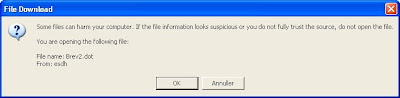
SharePoint uses the ActiveXObject from the browser, SharePoint.OpenDocuments, and invokes the function CreateNewDocument (or CreateNewDocument2 in MOSS 2007) with the location of the template (http://...) and the default save location (set to the current folder).
This blog describes how to fix the issue.
However, this didn't change anything for me. Instead I checked out the htmltransinfo.xml file found in "c:\Program Files\Common Files\Microsoft Shared\web server extensions\12\TEMPLATE\XML". Notice HandlerUrl - and also notice that when opening Word documents directly from SharePoint these errors doesn't occur. Didn't change anything either.
Some claims running Office Diagnostics solves the issue - haven't got time to try out this model - yet!
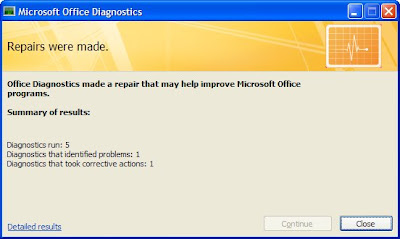
Tried it - no luck :-(
Some files can harm your computer. If the file information looks suspicious or you do not fully trust the source, do not open the file.

SharePoint uses the ActiveXObject from the browser, SharePoint.OpenDocuments, and invokes the function CreateNewDocument (or CreateNewDocument2 in MOSS 2007) with the location of the template (http://...) and the default save location (set to the current folder).
This blog describes how to fix the issue.
However, this didn't change anything for me. Instead I checked out the htmltransinfo.xml file found in "c:\Program Files\Common Files\Microsoft Shared\web server extensions\12\TEMPLATE\XML". Notice HandlerUrl - and also notice that when opening Word documents directly from SharePoint these errors doesn't occur. Didn't change anything either.
Some claims running Office Diagnostics solves the issue - haven't got time to try out this model - yet!

Tried it - no luck :-(
Thursday, August 28, 2008
Application Event Log: Unable to connect publishing custom string handler for output caching.
We often get the following error in the eventlog on the SharePoint IIS Server:
Unable to connect publishing custom string handler for output caching.
It would be excellent to learn how to avoid this issue.
Googling the issue many refers to modifying web.config and either add or remove entries to the httpModule section.
Unable to connect publishing custom string handler for output caching.
It would be excellent to learn how to avoid this issue.
Googling the issue many refers to modifying web.config and either add or remove entries to the httpModule section.
But what works? You tell me.
This blog most likely gives a great explanation of the issue. In SharePoint 2003 you had the concept of managed paths - so if you had other web applications on the server you needed to specify these explicit. In MOSS 2007 this feature is removed from the administration tool - and the above blog indicates that it should be added directly in web.config.
Saturday, August 16, 2008
Create a DOCX programmatically
This blog provides a simple example on how to create an Office 2007 docx document.
Monday, August 11, 2008
Web part import - zoneIndex doesn't work
If you have ever tried to import web parts using SPLimitedWebPartManager AddWebPart you'll notice the zoneIndex parameter.
Unfortunately it turns out that zoneIndex only works if web parts are imported in sequence - so you'll need to make certain import is done in the proper sequence order.
After import zoneIndex cannot be modified programmatically - at least I've not found a way to do this.
Unfortunately it turns out that zoneIndex only works if web parts are imported in sequence - so you'll need to make certain import is done in the proper sequence order.
After import zoneIndex cannot be modified programmatically - at least I've not found a way to do this.
Saturday, August 02, 2008
Adding a contenttype to a list using Office
Today I learned that it's possible to add a content type to a list using Word. Facinating feature! It's even possible for users not allowed to administer the list to add a content type.
How is this done.
As SharePoint runs promote/demote document properties the content type id is added to the list. I wonder what happens when documents are sent between organisations - will probably be quite messy!
How is this done.
- Open a Word dokument from another list with the content type you wish to use
- Save the Word dokument to the new list
Voila - missing accomplished.
The way Office and SharePoint support this feature is through the ContentTypeId property found in Word as outlined below.
As SharePoint runs promote/demote document properties the content type id is added to the list. I wonder what happens when documents are sent between organisations - will probably be quite messy!
Subscribe to:
Posts (Atom)