I uge 16 fokuserer vi på at arbejde smartere.
Følg debatten på fx Facebook.
Wednesday, March 28, 2012
Monday, March 05, 2012
Tuesday, February 07, 2012
Befriende med e-mailfri januar
Anders Elbak fra IDC Nordic skriver at email er bedre da det gemmes til forskel fra chat. Jeg vil faktisk mene at det forholder sig omvendt. I vores løsning anvendes en aktivitetsstrøm som gemmes og dermed automatisk er arkiveret på relevante forretningsobjekter.
Tuesday, January 31, 2012
Ph.D. - adaptive case management
Now it's official - we co-sposor a PhD student at the IT University of Copenhagen.
Flow charts replaced with a new logic - dynamic condition response. Easier to understand for business users - easier to implement for IT people. The gap beteween business and IT is narrowing.
Flow charts replaced with a new logic - dynamic condition response. Easier to understand for business users - easier to implement for IT people. The gap beteween business and IT is narrowing.
Wednesday, January 25, 2012
Tuesday, January 17, 2012
The importance of synchronous event handlers
Finally a good explanation on the issues we face with SharePoint 2010 compared with SharePoint 2007. We have a global unique document id which enables us to support quality requirements such as FDA 21 CFR Part 11 and ISO 9000. Everytime a document is added to SharePoint we give it a unique id and makes a MD5 hash of the metadata and document in order to prove that the document was indeed created on the specific date. When making a major approval, publishing, we run a workflow which prompts various users for a electronic signature which is stored with the document.
This works great in SharePoint 2007. We use ItemAdded to add the unique document id. However, we sometimes face some issues with SharePoint 2010. Obviously it is related to the timing om ItemAdded which is used. As it runs asynchronous we cannot be certain when the code is run - so sometimes we experience that the code is run and a unique document id is assigned to the document, but when we check the document afterwards the field is empty.
Setting ItemAdded to run synchronous solves our issue. Thanks for the hint.
This works great in SharePoint 2007. We use ItemAdded to add the unique document id. However, we sometimes face some issues with SharePoint 2010. Obviously it is related to the timing om ItemAdded which is used. As it runs asynchronous we cannot be certain when the code is run - so sometimes we experience that the code is run and a unique document id is assigned to the document, but when we check the document afterwards the field is empty.
Setting ItemAdded to run synchronous solves our issue. Thanks for the hint.
Monday, January 16, 2012
#NoEmail - New Year promise - no more emails
Tuesday, January 03, 2012
SharePoint content - Anywhere
Exformatics Anywhere enables access to SharePoint content behind the firewall from your iPhone, iPad ogg Android device.
Enterprise Content Management (ECM) solutions can now be accessed from mobile devices. Several links refers to this.
Find application on Android Market.
Enterprise Content Management (ECM) solutions can now be accessed from mobile devices. Several links refers to this.
Find application on Android Market.
Wednesday, December 21, 2011
Saturday, June 11, 2011
Friday, March 18, 2011
Thursday, March 17, 2011
Danske Exformatics vil udrydde interne e-mails
Værd at læse. Vi har sådan set sagt dette siden 2003 men som altid tager det tid at få den slags budskaber ud.
Tuesday, January 11, 2011
Lean med SharePoint
ESDH OG LEAN SIKRER EFFEKTIVITETEN I TELE GREENLAND
Læs mere om Lean og ESDH hos Tele Greenland her.Monday, January 10, 2011
Sunday, January 09, 2011
Design of a Distributed Case Management System using Dynamic Condition Response Graphs
We present a case study of a design of a distributed case management system using Dynamic Condition Response (DCR) Graphs, a recently proposed declarative notation for distributed processes. The case study was carried out jointly with our industrial partner Exformatics, a danish provider of knowledge and workflow management systems. We present an early prototype design and simulation tool and outline the proposal for the continued work of the two last authors towards the PhD degree, developing the model, technologies and tools further to make it applicable to component and model based design of distributed systems.
Highly recommended if you wish to understand the 21st century business workflow.
Highly recommended if you wish to understand the 21st century business workflow.
Wednesday, October 13, 2010
SharePoint is case-sensitive - documents upload into root-folder
It took us quite a while to figure out this issue. It turns out that SharePoint sitenames og document libraries are case-sensitive. If you try to navigate to a folder using it's URL and type the site og document library in the wrong case it seems to work. However, when trying to upload documents it fails. Documents are then placed in the root-folder of the document library as outlined below.
Given a standard document library "Documents" you create a new folder "Folder1".

 and then click Upload to upload a document, "My New Document.docx", and everything works as it should:
 Now, try to enter the URL of the folder directly in your browser in this case enter
where "Documents" is modified to "documents" (little d).
As you can see everything seems to work as they should:
 However, when you try to click Upload
 the document is not uploaded into the folder


Given a standard document library "Documents" you create a new folder "Folder1".

Navigate to the folder


where "Documents" is modified to "documents" (little d).
As you can see everything seems to work as they should:


but instead the document ends up in the root-folder of the Document library:

Quite a scary error in a standard product used by so many people in the world. When I presented the problem to a Microsoft representative claiming SharePoint to be case-sensitive they didn't believe me until I presented the above example.
Therefore. Remember that site-names and Document Libraries in SharePoint are case-sensitive.
Tuesday, April 20, 2010
Sæt strøm til processerne - fra arbejdsgang analyse over BPMN til digitale arbejdsgange
Exformatics har i foråret 2010 sammen med Kommunernes Landsforening arbejdet med at digitalisere arbejdsgange. Med udgangspunkt i en arbejdsganganalyse og efterfølgende modellering i BPMN er arbejdsgangen placeret i KL's arbejdsgangbank.
Exformatics har på baggrund af fremsendt BPMN diagram (i XPDL) mappet dette til vores arbejdsgang motor (Exformatics Process) således at arbejdsgangen efterfølgende er faciliteret digitalt.
Læs om projektet på KL's hjemmeside.
Exformatics detaljerede besvarelse af KL's opgave kan findes på dette link.
Exformatics har på baggrund af fremsendt BPMN diagram (i XPDL) mappet dette til vores arbejdsgang motor (Exformatics Process) således at arbejdsgangen efterfølgende er faciliteret digitalt.
Læs om projektet på KL's hjemmeside.
Exformatics detaljerede besvarelse af KL's opgave kan findes på dette link.
Monday, March 22, 2010
Wednesday, March 17, 2010
Wednesday, February 10, 2010
Office 2007 and MOSS - custom document properties
When adding Office 2003 documents to MOSS custom document properties in Office 2003 are added as SharePoint properties in a content class. Setting custom documents properties in Office 2003 is easy and well known.
When uploading Office 2007 documents to MOSS with custom documents properties set in the same manner as in Office 2003 documents, MOSS properties are not set.
I found this blog which points out a solution and it works fine if you're working with Office 2007 templates. However, if your template is a Office 2003 DOT-file and saves the document as an Office 2007 it doesn't work anyway.
Update: I found the following msdn blog which is worth reading.
When uploading Office 2007 documents to MOSS with custom documents properties set in the same manner as in Office 2003 documents, MOSS properties are not set.
I found this blog which points out a solution and it works fine if you're working with Office 2007 templates. However, if your template is a Office 2003 DOT-file and saves the document as an Office 2007 it doesn't work anyway.
Update: I found the following msdn blog which is worth reading.

Friday, January 22, 2010
Professionshøjskolen Metropol får ESDH fra Exformatics
Professionshøjskolen Metropol får nu ESDH fra Exformatics. Uddannelsesinstitutionen skal fremover bruge Exformatics ESDH til sagsstyring i administrationen, der sørger for den daglige drift af uddannelser på flere forskellige adresser i København.
Læs mere på Version2 eller Exformatics.
Læs mere på Version2 eller Exformatics.
Tuesday, January 05, 2010
Identify Publish a Major Version
For some strange reason SharePoint doesn't raise an ItemCheckingIn or ItemCheckedIn event when documents are published in new major versions, unless you do a Checkin and select major version in the same operation.
How can you identify a "Publish a Major Version" with other events? I did some googling and experiments and found out that using BeforeProperties and AfterProperties in the ItemUpdating handler might do the job. Similar posts can be found here, but I didn't get the same result.

int iBefore, iAfter;
iBefore = int.Parse(properties.BeforePropeties["vti_level"]);
iAfter = int.Parse(properties.AfterPropeties["vti_level"]);
Using the value of iBefore and iAfter I was able to identify the following events:
So if (iBefore == iAfter) you a facing a "Publish a Major Version" event.
How can you identify a "Publish a Major Version" with other events? I did some googling and experiments and found out that using BeforeProperties and AfterProperties in the ItemUpdating handler might do the job. Similar posts can be found here, but I didn't get the same result.

int iBefore, iAfter;
iBefore = int.Parse(properties.BeforePropeties["vti_level"]);
iAfter = int.Parse(properties.AfterPropeties["vti_level"]);
Using the value of iBefore and iAfter I was able to identify the following events:
| Event | iBefore | iAfter |
| CheckIn Minor Version | 255 | 255 |
| CheckIn Major Version | 255 | 1 |
| Publish a Major Version | 2 | 2 |
So if (iBefore == iAfter) you a facing a "Publish a Major Version" event.
Wednesday, December 02, 2009
Images in a dropdown list - SELECT
Rumours says that Microsoft will announce support for jQuery in SharePoint 2010, so better get started. We have used AJAX and more recently jQuery for the last 3 years in combination with SharePoint and it has proved very useful. And even if Microsoft don't support jQuery I believe it will be a major development platform for advanced end-user interfaces in the future - also for SharePoint.
Check out this example for how to enhance your existing drop down lists to include images - yes, it looks so much nicer - and navigation is like a dream.

Check out this example for how to enhance your existing drop down lists to include images - yes, it looks so much nicer - and navigation is like a dream.
Monday, November 30, 2009
Panel for dokumentoplysninger kunne ikke indlæses
When opening an Excel dokument based on a standard Excel XLT template stored in SharePoint I get the error outlined below. Ideas appreciated.

An English example can be found in this blog. The error Outlined is:
The form contains schema validation errors.
Content for element '{http://schemas.microsoft.com/office/2006/metadata/propertiesRoot}properties' is incomplete according to the DTD/Schema.
Expecting: {http://schemas.microsoft.com/office/2006/metadata/properties}properties.
How can this happen?
The schema is outlined at MSDN.
Errors have been reported by many here and here.
Friday, November 27, 2009
SharePoint 2010 wiki's
Using Wiki's in SharePoint 2007 can be done, but it is a first version type of product. Luckily Microsoft has announced better wiki support in SharePoint 2010 with Managed Keywords which can be used to create tag clouds and home pages can be edites as wiki's - a huge step forward for WYSIWIG editing. I found this blog interesting.
Thursday, November 26, 2009
Få forretningen til at håndtere arbejdsprocesserne
En af de centrale udfordringen at sætte strøm til arbejdsprocesser er at få forretningsbrugerne til at formulere processen og efterfølgende få denne designet og implementeret af IT folk. Der tales forskellige sprog og der er langt fra tanke til handling.
Tænk hvis det var muligt at forretningsbrugeren på en og samme tid udtrykker arbejdsgangene og dermed samtidig designer og implementerer processen i et IT system. Dermed vill man sikre at forretningsbrugeren kunne tage ansvaret for arbejdsgangene da de ikke som udgangspunkt skal have IT folk involveret i processen.
Exformatics taler på ITU seminar mandag den 7. december 2009 om udfordringerne ved at realisere en sådan tankegang.
Tænk hvis det var muligt at forretningsbrugeren på en og samme tid udtrykker arbejdsgangene og dermed samtidig designer og implementerer processen i et IT system. Dermed vill man sikre at forretningsbrugeren kunne tage ansvaret for arbejdsgangene da de ikke som udgangspunkt skal have IT folk involveret i processen.
Exformatics taler på ITU seminar mandag den 7. december 2009 om udfordringerne ved at realisere en sådan tankegang.
Friday, November 20, 2009
Monday, October 26, 2009
Linking iPhone with SharePoint
Exformatics now links SharePoint with Apple iPhone in order to facilitate mobile connectivity to corporate knowledge bases. Read more here.
Here too or here.
Eller her.
Scan-Jour lukkes og Exformatics overtager.
Here too or here.
Eller her.
Scan-Jour lukkes og Exformatics overtager.
Saturday, October 24, 2009
Creating a Web Part Page programmatically
Using Microsoft.SharePoint API is often not the most easy thing in the world. As an example adding a web part page programmatically is not an easy job - unless you're lucky and hit the right page on MSDN.
I have been trying to add a pages using the SPFolder.Files.Add(, SPTemplateFileType.StandardPage) - but the page was not added as a WebPartPage so I couldn't add web parts to the page in a proper manner.
It was not until I came across the NewWebPage method on MSDN that I managed to get the job done.
I have been trying to add a pages using the SPFolder.Files.Add(
It was not until I came across the NewWebPage method on MSDN that I managed to get the job done.
Tuesday, October 20, 2009
Monday, October 19, 2009
jQuery library for SharePoint services
Using AJAX and jQuery to retrieve data from SharePoint and present it to end-users in advanced end-user interfaces is certainly the way forward.Check out this library for more information. Looks quite promising and have done some tests.
Monday, October 12, 2009
Create a Wiki page programmatically
If you have ever tried to figure out how to create a web part page or wiki page programmatically you'll find it very hard to find any information.
Microsoft MSDN doesn't have a lot of information.
Recently I came across this blog. So some information is out there - not much though.
Microsoft MSDN doesn't have a lot of information.
Recently I came across this blog. So some information is out there - not much though.
Friday, September 25, 2009


Saturday, September 19, 2009
Tuesday, September 15, 2009
Updating document field value in SPItemEventReceiver.ItemCheckingIn() event handler
I need to update a property on ItemCheckingIn and came across this blog. Lucky me.
I have tried method 6
properties.AfterProperties.ChangedProperties["Field Internal Name"] = "New Value";
but I couldn't get it working.
"Field Internal Name" should be "vti_Field Internal Name". Microsoft purchased SharePoint from a company called something with VTI. Unfortunately this didn't work either.
This blog is also worth reading as it explains the sequence of events.
I have tried method 6
properties.AfterProperties.ChangedProperties["Field Internal Name"] = "New Value";
but I couldn't get it working.
"Field Internal Name" should be "vti_Field Internal Name". Microsoft purchased SharePoint from a company called something with VTI. Unfortunately this didn't work either.
This blog is also worth reading as it explains the sequence of events.
Saturday, August 15, 2009
Friday, August 07, 2009
Writing to SharePoint Unified Log
Writing to Windows EventLog sometimes causes issues in SharePoint, especially if using NTLM security. In this situation you might have to allow anonymous write access to the Event log by adding information to a specific registry key (Google if you wish more info on the matter).
As an alternative you can write to SharePoint own log, Unified Log, as described here on msdn.
Btw - I wonder why people in other blogs copy the content from MSDN and place it on their own blogs. What's the idea? It doesn't add any value - it only created confusion as I tend to ask myself. What is the difference?
As an alternative you can write to SharePoint own log, Unified Log, as described here on msdn.
Btw - I wonder why people in other blogs copy the content from MSDN and place it on their own blogs. What's the idea? It doesn't add any value - it only created confusion as I tend to ask myself. What is the difference?
Thursday, July 30, 2009
ItemCheckingIn and version number - MOSS SP2 behavior
Thursday, July 23, 2009
Creating a site-collection programmatically
How do you create a new root site programmatically in C# or VB.Net. Check out this blog for more information.
Saturday, July 04, 2009
Office - There has been a network or file permission error
Some of our clients are occationally experiencing the following error in Office "There has been a network or file permission error".

It's hard to find an explanation for the issue but I found this blog quite interesting. Indexing services on Windows Vista could cause the problem.
Another great blog describes ways to solve it for Windows XP SP2 and Office 2007.

It's hard to find an explanation for the issue but I found this blog quite interesting. Indexing services on Windows Vista could cause the problem.
Another great blog describes ways to solve it for Windows XP SP2 and Office 2007.
Friday, June 19, 2009
Thursday, June 04, 2009
ItemAdded - setting values - Microsoft recommendation
If you wish to set property values in an ItemAdded event in SharePoint - you need to create a separate thread that sleeps 10 seconds and then set the value. SharePoint is obviously not a transactional system. Read more in this blog.
Thursday, May 28, 2009
Disable property promotion/demotion
I've been looking for ways to enable/disable property promotion/demotion without luck. Finally I found someone who had worked with this - it works.
Monday, May 25, 2009
Creating a web service in F#
Check out this blog on how to create a web service leveraging Microsoft's functional programming language F#.
Monday, May 18, 2009
More on SharePoint 2010
Doing research on Microsoft SharePoint 2010 I came across various articles and I found this from Lars Fastrup quite useful. Brief and to the point.
Tuesday, April 21, 2009
SharePoint 2010
The MOSS acronym is going away as Office will be referred to as the client product only. Not certain I buy the reason for this. In fact I view Office as the whole lot - editing as well as storing and managing. But obviously Microsoft don't have the same view - or their customers don't.
Read the blog http://blogs.msdn.com/sharepoint/archive/2009/04/14/microsoft-sharepoint-14-is-now-microsoft-sharepoint-2010.aspx here.
Read the blog http://blogs.msdn.com/sharepoint/archive/2009/04/14/microsoft-sharepoint-14-is-now-microsoft-sharepoint-2010.aspx here.
Friday, April 03, 2009
MOSS Performance considerations
I just read this blog about performance considerations in MOSS 2007. Especially the section about SPList object is worth reading in detail.
Using the List.Items.Count should be avoided at any costs. It basically send a very complex and expensive SQL query, especially on large lists. If you need statistics use the List.ItemCount instead which uses the statistics information from SQL Server about the list to provide data. No absolutely correct though.
Using the List.Items.Count should be avoided at any costs. It basically send a very complex and expensive SQL query, especially on large lists. If you need statistics use the List.ItemCount instead which uses the statistics information from SQL Server about the list to provide data. No absolutely correct though.
Wednesday, March 04, 2009
Wednesday, February 11, 2009
Very large document libraries - very strange SQL
If you ever come across the following SQL statement you need to take a critical look at various web parts other SharePoint related code recently deployed at your site.
SELECT TOP 2147483648 t2.[tp_Created] AS c3c8,t1.[Type] AS c0,t3.[tp_ID] AS c10c5,UserData.[nvarchar10],t1.[Id] AS c15,t4.[tp_Created] AS c17c8,UserData.[tp_ItemOrder],UserData.[tp_ModerationStatus],UserData.[nvarchar1],UserData.[nvarchar6],UserData.[bit2],UserData.[tp_Created],t1.[CheckinComment] AS c23,UserData.[tp_WorkflowInstanceID],t2.[nvarchar4] AS c3c6,t3.[tp_Created] AS c10c8,UserData.[ntext1],t4.[nvarchar4] AS c17c6,t1.[DirName] AS c18,UserData.[tp_ID],t1.[ProgId] AS c13,UserData.[nvarchar5],UserData.[bit1],t1.[Size] AS c21,UserData.[tp_GUID],t1.[TimeCreated] AS c1,UserData.[tp_Editor],UserData.[tp_Author],t2.[nvarchar1] AS c3c4,t3.[nvarchar4] AS c10c6,UserData.[nvarchar2],UserData.[nvarchar7],UserData.[nvarchar13],UserData.[tp_ContentType],t1.[LTCheckoutUserId] AS c20,t1.[TimeLastModified] AS c9,CASE WHEN DATALENGTH(t1.DirName) = 0 THEN t1.LeafName WHEN DATALENGTH(t1.LeafName) = 0 THEN t1.DirName ELSE t1.DirName + N'/' + t1.LeafName END AS c11,t1.[ScopeId] AS c16,UserData.[tp_ContentTypeId],UserData.[sql_variant1],t4.[nvarchar1] AS c17c4,UserData.[tp_WorkflowVersion],t1.[ParentVersionString] AS c24,UserData.[nvarchar4],UserData.[tp_CheckoutUserId],UserData.[tp_Version],UserData.[nvarchar9],t5.[nvarchar1] AS c4,UserData.[tp_IsCurrentVersion],t2.[nvarchar5] AS c3c7,t3.[nvarchar1] AS c10c4,UserData.[tp_HasCopyDestinations],UserData.[tp_Level],UserData.[nvarchar12],t1.[MetaInfo] AS c14,t4.[nvarchar5] AS c17c7,t1.[Size] AS c19,t1.[LeafName] AS c2,UserData.[tp_Modified],UserData.[nvarchar3],UserData.[nvarchar8],UserData.[tp_UIVersion],t2.[tp_ID] AS c3c5,t3.[nvarchar5] AS c10c7,UserData.[tp_CopySource],UserData.[nvarchar11],UserData.[tp_InstanceID],t1.[IsCheckoutToLocal] AS c12,t4.[tp_ID] AS c17c5,UserData.[tp_UIVersionString],t1.[ParentLeafName] AS c25 FROM UserData INNER MERGE JOIN Docs AS t1 WITH(NOLOCK) ON ( 1 = 1 AND UserData.[tp_RowOrdinal] = 0 AND t1.SiteId = UserData.tp_SiteId AND t1.SiteId = @L2 AND t1.DirName = UserData.tp_DirName AND t1.LeafName = UserData.tp_LeafName AND t1.Level = UserData.tp_Level AND (UserData.tp_Level = 255 AND t1.LTCheckoutUserId =@IU OR (UserData.tp_Level = 1 AND (UserData.tp_DraftOwnerId IS NULL OR (UserData.tp_DraftOwnerId <>@IU AND 1=0 )) OR UserData.tp_Level = 2 AND (UserData.tp_DraftOwnerId = @IU OR 1=1 )) AND (t1.LTCheckoutUserId IS NULL OR t1.LTCheckoutUserId <> @IU )) AND (1 = 1)) LEFT OUTER JOIN AllUserData AS t2 WITH(NOLOCK, INDEX=AllUserData_PK) ON (UserData.[tp_Editor]=t2.[tp_ID] AND UserData.[tp_RowOrdinal] = 0 AND t2.[tp_RowOrdinal] = 0 AND ( (t2.tp_IsCurrent = 1) ) AND t2.[tp_CalculatedVersion] = 0 AND t2.[tp_DeleteTransactionId] = 0x AND t2.tp_ListId = @L3 AND UserData.tp_ListId = @L4) LEFT OUTER JOIN AllUserData AS t3 WITH(NOLOCK, INDEX=AllUserData_PK) ON (UserData.[tp_CheckoutUserId]=t3.[tp_ID] AND UserData.[tp_RowOrdinal] = 0 AND t3.[tp_RowOrdinal] = 0 AND ( (t3.tp_IsCurrent = 1) ) AND t3.[tp_CalculatedVersion] = 0 AND t3.[tp_DeleteTransactionId] = 0x AND t3.tp_ListId = @L3 AND UserData.tp_ListId = @L4) LEFT OUTER JOIN AllUserData AS t4 WITH(NOLOCK, INDEX=AllUserData_PK) ON (UserData.[tp_Author]=t4.[tp_ID] AND UserData.[tp_RowOrdinal] = 0 AND t4.[tp_RowOrdinal] = 0 AND ( (t4.tp_IsCurrent = 1) ) AND t4.[tp_CalculatedVersion] = 0 AND t4.[tp_DeleteTransactionId] = 0x AND t4.tp_ListId = @L3 AND UserData.tp_ListId = @L4) LEFT OUTER JOIN AllUserData AS t5 WITH(NOLOCK, INDEX=AllUserData_PK) ON (t1.[LTCheckoutUserId]=t5.[tp_ID] AND t5.[tp_RowOrdinal] = 0 AND ( (t5.tp_IsCurrent = 1) ) AND t5.[tp_CalculatedVersion] = 0 AND t5.[tp_DeleteTransactionId] = 0x AND t5.tp_ListId = @L3) WHERE (UserData.tp_Level= 255 AND UserData.tp_CheckoutUserId = @IU OR ( UserData.tp_Level = 2 AND UserData.tp_DraftOwnerId IS NOT NULL OR UserData.tp_Level = 1 AND UserData.tp_DraftOwnerId IS NULL ) AND ( UserData.tp_CheckoutUserId IS NULL OR UserData.tp_CheckoutUserId <> @IU)) AND UserData.tp_SiteId=@L2 AND (UserData.tp_DirName=@DN OR UserData.tp_DirName LIKE @DNEL+N'/%') AND UserData.tp_RowOrdinal=0 AND (t1.SiteId=@L2 AND (t1.DirName=@DN OR t1.DirName LIKE @DNEL+N'/%') AND t1.Type=0) ORDER BY t1.[Type] Desc,UserData.[tp_ID] Asc OPTION (FORCE ORDER)
This blog describes a similar issue, as well as this blog. Using
targetList.Items[...]
can cause this issue. Use
targetList.GetItemByUniqueId(...) or
targetList.GetItemById(...)
instead.
Also - might be related to this issue reported by Microsoft. A hotfix exists!
SELECT TOP 2147483648 t2.[tp_Created] AS c3c8,t1.[Type] AS c0,t3.[tp_ID] AS c10c5,UserData.[nvarchar10],t1.[Id] AS c15,t4.[tp_Created] AS c17c8,UserData.[tp_ItemOrder],UserData.[tp_ModerationStatus],UserData.[nvarchar1],UserData.[nvarchar6],UserData.[bit2],UserData.[tp_Created],t1.[CheckinComment] AS c23,UserData.[tp_WorkflowInstanceID],t2.[nvarchar4] AS c3c6,t3.[tp_Created] AS c10c8,UserData.[ntext1],t4.[nvarchar4] AS c17c6,t1.[DirName] AS c18,UserData.[tp_ID],t1.[ProgId] AS c13,UserData.[nvarchar5],UserData.[bit1],t1.[Size] AS c21,UserData.[tp_GUID],t1.[TimeCreated] AS c1,UserData.[tp_Editor],UserData.[tp_Author],t2.[nvarchar1] AS c3c4,t3.[nvarchar4] AS c10c6,UserData.[nvarchar2],UserData.[nvarchar7],UserData.[nvarchar13],UserData.[tp_ContentType],t1.[LTCheckoutUserId] AS c20,t1.[TimeLastModified] AS c9,CASE WHEN DATALENGTH(t1.DirName) = 0 THEN t1.LeafName WHEN DATALENGTH(t1.LeafName) = 0 THEN t1.DirName ELSE t1.DirName + N'/' + t1.LeafName END AS c11,t1.[ScopeId] AS c16,UserData.[tp_ContentTypeId],UserData.[sql_variant1],t4.[nvarchar1] AS c17c4,UserData.[tp_WorkflowVersion],t1.[ParentVersionString] AS c24,UserData.[nvarchar4],UserData.[tp_CheckoutUserId],UserData.[tp_Version],UserData.[nvarchar9],t5.[nvarchar1] AS c4,UserData.[tp_IsCurrentVersion],t2.[nvarchar5] AS c3c7,t3.[nvarchar1] AS c10c4,UserData.[tp_HasCopyDestinations],UserData.[tp_Level],UserData.[nvarchar12],t1.[MetaInfo] AS c14,t4.[nvarchar5] AS c17c7,t1.[Size] AS c19,t1.[LeafName] AS c2,UserData.[tp_Modified],UserData.[nvarchar3],UserData.[nvarchar8],UserData.[tp_UIVersion],t2.[tp_ID] AS c3c5,t3.[nvarchar5] AS c10c7,UserData.[tp_CopySource],UserData.[nvarchar11],UserData.[tp_InstanceID],t1.[IsCheckoutToLocal] AS c12,t4.[tp_ID] AS c17c5,UserData.[tp_UIVersionString],t1.[ParentLeafName] AS c25 FROM UserData INNER MERGE JOIN Docs AS t1 WITH(NOLOCK) ON ( 1 = 1 AND UserData.[tp_RowOrdinal] = 0 AND t1.SiteId = UserData.tp_SiteId AND t1.SiteId = @L2 AND t1.DirName = UserData.tp_DirName AND t1.LeafName = UserData.tp_LeafName AND t1.Level = UserData.tp_Level AND (UserData.tp_Level = 255 AND t1.LTCheckoutUserId =@IU OR (UserData.tp_Level = 1 AND (UserData.tp_DraftOwnerId IS NULL OR (UserData.tp_DraftOwnerId <>@IU AND 1=0 )) OR UserData.tp_Level = 2 AND (UserData.tp_DraftOwnerId = @IU OR 1=1 )) AND (t1.LTCheckoutUserId IS NULL OR t1.LTCheckoutUserId <> @IU )) AND (1 = 1)) LEFT OUTER JOIN AllUserData AS t2 WITH(NOLOCK, INDEX=AllUserData_PK) ON (UserData.[tp_Editor]=t2.[tp_ID] AND UserData.[tp_RowOrdinal] = 0 AND t2.[tp_RowOrdinal] = 0 AND ( (t2.tp_IsCurrent = 1) ) AND t2.[tp_CalculatedVersion] = 0 AND t2.[tp_DeleteTransactionId] = 0x AND t2.tp_ListId = @L3 AND UserData.tp_ListId = @L4) LEFT OUTER JOIN AllUserData AS t3 WITH(NOLOCK, INDEX=AllUserData_PK) ON (UserData.[tp_CheckoutUserId]=t3.[tp_ID] AND UserData.[tp_RowOrdinal] = 0 AND t3.[tp_RowOrdinal] = 0 AND ( (t3.tp_IsCurrent = 1) ) AND t3.[tp_CalculatedVersion] = 0 AND t3.[tp_DeleteTransactionId] = 0x AND t3.tp_ListId = @L3 AND UserData.tp_ListId = @L4) LEFT OUTER JOIN AllUserData AS t4 WITH(NOLOCK, INDEX=AllUserData_PK) ON (UserData.[tp_Author]=t4.[tp_ID] AND UserData.[tp_RowOrdinal] = 0 AND t4.[tp_RowOrdinal] = 0 AND ( (t4.tp_IsCurrent = 1) ) AND t4.[tp_CalculatedVersion] = 0 AND t4.[tp_DeleteTransactionId] = 0x AND t4.tp_ListId = @L3 AND UserData.tp_ListId = @L4) LEFT OUTER JOIN AllUserData AS t5 WITH(NOLOCK, INDEX=AllUserData_PK) ON (t1.[LTCheckoutUserId]=t5.[tp_ID] AND t5.[tp_RowOrdinal] = 0 AND ( (t5.tp_IsCurrent = 1) ) AND t5.[tp_CalculatedVersion] = 0 AND t5.[tp_DeleteTransactionId] = 0x AND t5.tp_ListId = @L3) WHERE (UserData.tp_Level= 255 AND UserData.tp_CheckoutUserId = @IU OR ( UserData.tp_Level = 2 AND UserData.tp_DraftOwnerId IS NOT NULL OR UserData.tp_Level = 1 AND UserData.tp_DraftOwnerId IS NULL ) AND ( UserData.tp_CheckoutUserId IS NULL OR UserData.tp_CheckoutUserId <> @IU)) AND UserData.tp_SiteId=@L2 AND (UserData.tp_DirName=@DN OR UserData.tp_DirName LIKE @DNEL+N'/%') AND UserData.tp_RowOrdinal=0 AND (t1.SiteId=@L2 AND (t1.DirName=@DN OR t1.DirName LIKE @DNEL+N'/%') AND t1.Type=0) ORDER BY t1.[Type] Desc,UserData.[tp_ID] Asc OPTION (FORCE ORDER)
This blog describes a similar issue, as well as this blog. Using
targetList.Items[...]
can cause this issue. Use
targetList.GetItemByUniqueId(...) or
targetList.GetItemById(...)
instead.
Also - might be related to this issue reported by Microsoft. A hotfix exists!
Thursday, February 05, 2009
RunWithElevatedPrivileges
We have developed a series of business web services leveraging SharePoint. However, some of our users sometimes ran into security issues when their security level was Contributor.
Luckily I read this article from MSDN which describe that the
new SPSite()
requires privileges above Contributor to work. Running the code in the context of RunWithElevatedPrivileges sovles the problem. Fantastic.
Luckily I read this article from MSDN which describe that the
new SPSite(
requires privileges above Contributor to work. Running the code in the context of RunWithElevatedPrivileges sovles the problem. Fantastic.
Thursday, January 15, 2009
Content Type is still in use
Despite the fact that no files has the a specified content type I still get the error content type is still in use when I try to delete the content type.
I came across this blog that stated that you also needed to look into previous versions of the files as well as files hidden.
Despite the fact that I have done this I cannot delete the ContentType.
I therefore looked into the SQL database in the AllUserData table in the Content database with the following SQL
SELECT *
FROM AllUserData
WHERE (tp_DirName LIKE '%')
AND ((tp_ContentType = ''))
ORDER BY tp_DirName
Then I got a list of files using the content type.
The main issue now is that I cannot figure out how to get rid of the content type from these files. Ideas very much appreciated.
I have
I came across this blog that stated that you also needed to look into previous versions of the files as well as files hidden.
Despite the fact that I have done this I cannot delete the ContentType.
I therefore looked into the SQL database in the AllUserData table in the Content database with the following SQL
SELECT *
FROM AllUserData
WHERE (tp_DirName LIKE '
AND ((tp_ContentType = '
ORDER BY tp_DirName
Then I got a list of files using the content type.
The main issue now is that I cannot figure out how to get rid of the content type from these files. Ideas very much appreciated.
I have
- Checked in documents
- Published them all - i.e. major version
- Previous versions has been deleted
- Emptied recycle bin
- Ensured the content type I wish to delete is not default content type (apart from the fact that SharePoint suggest it to be the new default when uploading documents - which is strange. Maybe this is the reason?)
So what do I do?
Even if I DELETE the files and REMOVE them from recycle bin they still appear in the SQL search. No wonder I cannot get rid of the content type!
Even if I go through all files in the Document Library and explicitly set
oFile.Item("ContentType") = <...>
I cannot DELETE the content type afterwards. Very strange.
Saturday, January 03, 2009
Server Error - SPRequest.AddOrUpdateItem
When trying to upload a specific Excel document to SharePoint I get the following error:

Other documents works just fine but a few documents fails. Ideas very much appreciated. Googling find various ideas:

Other documents works just fine but a few documents fails. Ideas very much appreciated. Googling find various ideas:
- Open document in Excel, Press Save As, and re-upload - don't help
- MS XML 6.0 de-installed on SharePoint Server - MSXML 6.0 SP2 installed
- Filesize - no relevant - file size is 54Kb
- Save as Excel 2007, then Excel 2003 Fixes the problem - unbelievable
Server Error in '/' Application.
Oplysningerne i Microsoft Office-dokumentet 06Emails/06-1912/Attachment/ABC.xls kunne ikke opdateres. Description: An unhandled exception occurred during the execution of the current web request. Please review the stack trace for more information about the error and where it originated in the code. Exception Details: System.Runtime.InteropServices.COMException: Oplysningerne i Microsoft Office-dokumentet 06Emails/06-1912/Attachment/ABC.xls kunne ikke opdateres.Source Error:
An unhandled exception was generated during the execution of the current web request. Information regarding the origin and location of the exception can be identified using the exception stack trace below. Stack Trace:
[COMException (0x81071003): Oplysningerne i Microsoft Office-dokumentet 06Emails/06-1912/Attachment/ABC.xls kunne ikke opdateres.]
Microsoft.SharePoint.Library.SPRequestInternalClass.AddOrUpdateItem(String bstrUrl, String bstrListName, Boolean bAdd, Boolean bSystemUpdate, Boolean bPreserveItemVersion, Boolean bUpdateNoVersion, Int32& plID, String& pbstrGuid, Guid pbstrNewDocId, Boolean bHasNewDocId, String bstrVersion, Object& pvarAttachmentNames, Object& pvarAttachmentContents, Object& pvarProperties, Boolean bCheckOut, Boolean bCheckin, Boolean bMigration, Boolean bPublish) +0
Microsoft.SharePoint.Library.SPRequest.AddOrUpdateItem(String bstrUrl, String bstrListName, Boolean bAdd, Boolean bSystemUpdate, Boolean bPreserveItemVersion, Boolean bUpdateNoVersion, Int32& plID, String& pbstrGuid, Guid pbstrNewDocId, Boolean bHasNewDocId, String bstrVersion, Object& pvarAttachmentNames, Object& pvarAttachmentContents, Object& pvarProperties, Boolean bCheckOut, Boolean bCheckin, Boolean bMigration, Boolean bPublish) +199
[SPException: Oplysningerne i Microsoft Office-dokumentet 06Emails/06-1912/Attachment/ABC.xls kunne ikke opdateres.]
Microsoft.SharePoint.Library.SPRequest.AddOrUpdateItem(String bstrUrl, String bstrListName, Boolean bAdd, Boolean bSystemUpdate, Boolean bPreserveItemVersion, Boolean bUpdateNoVersion, Int32& plID, String& pbstrGuid, Guid pbstrNewDocId, Boolean bHasNewDocId, String bstrVersion, Object& pvarAttachmentNames, Object& pvarAttachmentContents, Object& pvarProperties, Boolean bCheckOut, Boolean bCheckin, Boolean bMigration, Boolean bPublish) +240
Microsoft.SharePoint.SPListItem.AddOrUpdateItem(Boolean bAdd, Boolean bSystem, Boolean bPreserveItemVersion, Boolean bNoVersion, Boolean bMigration, Boolean bPublish, Boolean bCheckOut, Boolean bCheckin, Guid newGuidOnAdd, Int32& ulID, Object& objAttachmentNames, Object& objAttachmentContents, Boolean suppressAfterEvents) +934
Microsoft.SharePoint.SPListItem.UpdateInternal(Boolean bSystem, Boolean bPreserveItemVersion, Guid newGuidOnAdd, Boolean bMigration, Boolean bPublish, Boolean bNoVersion, Boolean bCheckOut, Boolean bCheckin, Boolean suppressAfterEvents) +182
Microsoft.SharePoint.SPListItem.Update() +88
Microsoft.SharePoint.WebControls.SaveButton.SaveItem(SPContext itemContext, Boolean uploadMode, String checkInComment) +725
Microsoft.SharePoint.WebControls.SaveButton.SaveItem() +58
Microsoft.SharePoint.WebControls.SaveButton.OnBubbleEvent(Object source, EventArgs e) +249
System.Web.UI.Control.RaiseBubbleEvent(Object source, EventArgs args) +35
System.Web.UI.WebControls.Button.OnCommand(CommandEventArgs e) +115
System.Web.UI.WebControls.Button.RaisePostBackEvent(String eventArgument) +163
System.Web.UI.WebControls.Button.System.Web.UI.IPostBackEventHandler.RaisePostBackEvent(String eventArgument) +7
System.Web.UI.Page.RaisePostBackEvent(IPostBackEventHandler sourceControl, String eventArgument) +11
System.Web.UI.Page.RaisePostBackEvent(NameValueCollection postData) +177
System.Web.UI.Page.ProcessRequestMain(Boolean includeStagesBeforeAsyncPoint, Boolean includeStagesAfterAsyncPoint) +1746
Version Information: Microsoft .NET Framework Version:2.0.50727.1433; ASP.NET Version:2.0.50727.1433
Sunday, December 07, 2008
SPListItem - SystemUpdate, UpdateOverwriteVersion, Update
If you have ever tried to figure out the various SPListItem Update methods the table below, stolen from this blog, gives you an excellent overview:
| Method | bSystem | bPreserveItemVersion | bNoVersion |
| SystemUpdate() | true | false | false |
| SystemUpdate(false) | true | true | false |
| UpdateOverwriteVersion() | false | false | true |
| Update() | false | false | false |
Friday, December 05, 2008
SPRequest object was not disposed before the end of this thread
Analysing SharePoint logfiles you might find a lot of Potentially excessive number of SPRequest objects warnings in the logfile.
In order to figure out the reason behind this warning you can add a registry key thereby getting a full stack trace as outlined in this blog.
In order to figure out the reason behind this warning you can add a registry key thereby getting a full stack trace as outlined in this blog.
Saturday, November 22, 2008
Delete a file from SharePoint
Deleting a file from SharePoint should be fairly easy, i.e. invoking the
SPFile.Delete()
method.
But when invoking this code from a custom web service I get "access denied" error.
Rather than creating my own web service I investigated using standard SharePoint web services. Files can be deleted using web services - as described in the blog where files are deleted from InfoPath.
This MSDN article also describes how to delete files.
Web services are just so much easier to use :-)
SPFile.Delete()
method.
But when invoking this code from a custom web service I get "access denied" error.
Rather than creating my own web service I investigated using standard SharePoint web services. Files can be deleted using web services - as described in the blog where files are deleted from InfoPath.
This MSDN article also describes how to delete files.
Web services are just so much easier to use :-)
Tuesday, October 28, 2008
Working with SharePoint web services - GetList and GetListAndView
Working with SharePoint web services is a challenge. Especially as it is not as well documented as you could have expected. So I often end up spending lots of time with small details which is mainly due to bad design. Let me give an example. Consider the GetList web service outlined below:

The web service contain one parameter:
listName
Whenever I use this web-service I always forget the it doesn't mean the name of the list, but the title of the list. Such a minor detail leads to waste of time - lot of time. And I'm probably not alone out here.
If you use the listName rather than listTitle you get the brilliant error message:
Guid should contain 32 digits with 4 dashes (xxxxxxxx-xxxx-xxxx-xxxx-xxxxxxxxxxxx).
Does anyone know how to retrieve information about a list from it's listName rather than listTitle? As end users can rename lists easily the URL for the list is probably better to use than the name.

The web service contain one parameter:
listName
Whenever I use this web-service I always forget the it doesn't mean the name of the list, but the title of the list. Such a minor detail leads to waste of time - lot of time. And I'm probably not alone out here.
If you use the listName rather than listTitle you get the brilliant error message:
Does anyone know how to retrieve information about a list from it's listName rather than listTitle? As end users can rename lists easily the URL for the list is probably better to use than the name.
Sunday, October 26, 2008
The security validation for this page is invalid
Wonder how to avoid the "The security validation for this page is invalid" error when using the SharePoint API. At least I do.
Fortunately I came across this blog yesterday. Not sure it solves all my problems - but I tried it out and some of the exceptions disappeared. I'll make more research.
Fortunately I came across this blog yesterday. Not sure it solves all my problems - but I tried it out and some of the exceptions disappeared. I'll make more research.
Saturday, October 04, 2008
Copying documents between doclibs - including metadata and versions
Moving or copying documents from one area in SharePoint to another is, unfortunately, not as easy as copying documents between folders in Windows Explorer.
Basically - you'll need to write a program to do so.
Luckily this blog descibres how.
Basically - you'll need to write a program to do so.
Luckily this blog descibres how.
Tuesday, September 16, 2008
The document could not be created.
The document could not be craeted. The required application may not be installed properly, or the template for this document library cannot be opened.

The error happens when I try to use a PowerPoint template file from SharePoint, POT.
Ideas very much appreciated.
Sunday, September 14, 2008
Office doesn't behave properly with SharePoint - components missing
Sometimes SharePoint is frustrating as different PC's behave differently, especially when dealing with Office documents. This is due to the fact that Office needs some specific ActiveX components that should normally be installed - but for some strange reason sometimes seems to be missing.
This blog refers to a possible solution.
Check out Microsoft KB 938888.
This blog refers to a possible solution.
Check out Microsoft KB 938888.
Monday, September 08, 2008
Office 2007 document upload - files corrupt
Adding a file to SharePoint can be implemented through a web service as described in the note from Microsoft. It works fine - for all types of documents except for Office 2007 documents!
Upload goes fine - but when you try to open the file using Office you get the following errors:


Upload goes fine - but when you try to open the file using Office you get the following errors:


The Office Open XML file
- Microsoft KB 928282 - Excel and Word related - not relevant
- Depressing news ...
Solution
SharePoint seems to have an error when adding documents to the filecollecting using the
SPFolder.Files.Add
function. If you add from a byte-array it simply fails with Office 2007 documents. But if you convert the byte-array into a stream, e.g. by saving the byte-array into a file and loading it into a stream, then it works. It's unclear to me why this error occurs - but Microsoft probably drops a single byte in the byte-scenario - which is critical for Office 2007 documents, but other documents seems to survive.
Input and comments very much appreciated.
Friday, August 29, 2008
Some files can harm your computer. If the file information looks suspicious or you do not fully trust the source, do not open the file.
Creating new document based on SharePoint templates you often get the error:
Some files can harm your computer. If the file information looks suspicious or you do not fully trust the source, do not open the file.
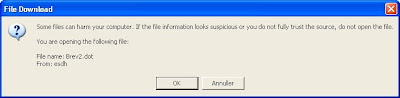
SharePoint uses the ActiveXObject from the browser, SharePoint.OpenDocuments, and invokes the function CreateNewDocument (or CreateNewDocument2 in MOSS 2007) with the location of the template (http://...) and the default save location (set to the current folder).
This blog describes how to fix the issue.
However, this didn't change anything for me. Instead I checked out the htmltransinfo.xml file found in "c:\Program Files\Common Files\Microsoft Shared\web server extensions\12\TEMPLATE\XML". Notice HandlerUrl - and also notice that when opening Word documents directly from SharePoint these errors doesn't occur. Didn't change anything either.
Some claims running Office Diagnostics solves the issue - haven't got time to try out this model - yet!
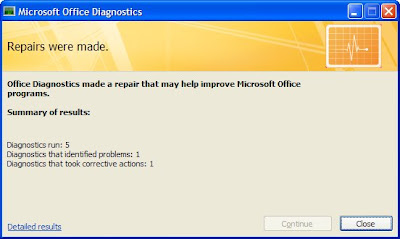
Tried it - no luck :-(
Some files can harm your computer. If the file information looks suspicious or you do not fully trust the source, do not open the file.

SharePoint uses the ActiveXObject from the browser, SharePoint.OpenDocuments, and invokes the function CreateNewDocument (or CreateNewDocument2 in MOSS 2007) with the location of the template (http://...) and the default save location (set to the current folder).
This blog describes how to fix the issue.
However, this didn't change anything for me. Instead I checked out the htmltransinfo.xml file found in "c:\Program Files\Common Files\Microsoft Shared\web server extensions\12\TEMPLATE\XML". Notice HandlerUrl - and also notice that when opening Word documents directly from SharePoint these errors doesn't occur. Didn't change anything either.
Some claims running Office Diagnostics solves the issue - haven't got time to try out this model - yet!

Tried it - no luck :-(
Thursday, August 28, 2008
Application Event Log: Unable to connect publishing custom string handler for output caching.
We often get the following error in the eventlog on the SharePoint IIS Server:
Unable to connect publishing custom string handler for output caching.
It would be excellent to learn how to avoid this issue.
Googling the issue many refers to modifying web.config and either add or remove entries to the httpModule section.
Unable to connect publishing custom string handler for output caching.
It would be excellent to learn how to avoid this issue.
Googling the issue many refers to modifying web.config and either add or remove entries to the httpModule section.
But what works? You tell me.
This blog most likely gives a great explanation of the issue. In SharePoint 2003 you had the concept of managed paths - so if you had other web applications on the server you needed to specify these explicit. In MOSS 2007 this feature is removed from the administration tool - and the above blog indicates that it should be added directly in web.config.
Saturday, August 16, 2008
Create a DOCX programmatically
This blog provides a simple example on how to create an Office 2007 docx document.
Monday, August 11, 2008
Web part import - zoneIndex doesn't work
If you have ever tried to import web parts using SPLimitedWebPartManager AddWebPart you'll notice the zoneIndex parameter.
Unfortunately it turns out that zoneIndex only works if web parts are imported in sequence - so you'll need to make certain import is done in the proper sequence order.
After import zoneIndex cannot be modified programmatically - at least I've not found a way to do this.
Unfortunately it turns out that zoneIndex only works if web parts are imported in sequence - so you'll need to make certain import is done in the proper sequence order.
After import zoneIndex cannot be modified programmatically - at least I've not found a way to do this.
Saturday, August 02, 2008
Adding a contenttype to a list using Office
Today I learned that it's possible to add a content type to a list using Word. Facinating feature! It's even possible for users not allowed to administer the list to add a content type.
How is this done.
As SharePoint runs promote/demote document properties the content type id is added to the list. I wonder what happens when documents are sent between organisations - will probably be quite messy!
How is this done.
- Open a Word dokument from another list with the content type you wish to use
- Save the Word dokument to the new list
Voila - missing accomplished.
The way Office and SharePoint support this feature is through the ContentTypeId property found in Word as outlined below.
As SharePoint runs promote/demote document properties the content type id is added to the list. I wonder what happens when documents are sent between organisations - will probably be quite messy!
Wednesday, July 30, 2008
?contents=1 - broken web part
Web Parts are smart - but sometimes SharePoint makes it a little too difficult. You cannot edit the page as it's broken. Simply add ?contents=1 to the URL of the page will help you out. Check out this blog. I'm graceful.
Friday, July 25, 2008
Word did not save the document
Suddenly we consistently got the error "Word did not save the document" trying to create or update document in SharePoint.

We tried to research the problem using Google but didn't really find an answer - something we found quite strange. Then we checked the SharePoint log-files found in
C:\Program Files\Common Files\Microsoft Shared\Web server extensions\12\Logs
and voila, we could locate the issue in the log-file, outlined below:
07/25/2008 11:20:13.31 w3wp.exe (0x1054) 0x1364 Windows SharePoint Services General 72ng Medium RPC method = put document 07/25/2008 11:20:13.31 w3wp.exe (0x1054) 0x1364 Windows SharePoint Services General 72n3 Medium put file doc URL = 07Docs/07-1521/New document.docx 07/25/2008 11:20:13.40 w3wp.exe (0x1054) 0x1364 Windows SharePoint Services Database 6f8g Unexpected Unexpected query execution failure, error code 9002. Additional error information from SQL Server is included below. "The transaction log for database 'INTRANET_Content' is full. To find out why space in the log cannot be reused, see the log_reuse_wait_desc column in sys.databases" Query text (if available): "DECLARE @@S uniqueidentifier; DECLARE @@DocId uniqueidentifier; DECLARE @@Level tinyint; DECLARE @@DocUIVersion int; DECLARE @@DoclibRowId int; DECLARE @@iRet int;DECLARE @DN nvarchar(256); DECLARE @LN nvarchar(128); DECLARE @FU nvarchar(260); SET @@Level=255 SET @@DocUIVersion =1 SET @@DocId='331203E1-CF23-4BE5-A306-B53A7F289DDF' SET @@S='9E4A9A77-CF3E-4881-9E6A-AADF9B17AB86'; EXEC @@DoclibRowId = proc_GenerateNextId 'D44ED427-5B4E-4AE0-AC38-BDDB2E54142E','2E51B790-B64E-43... 07/25/2008 11:20:13.40* w3wp.exe (0x1054) 0x1364 Windows SharePoint Services Database 6f8g Unexpected ...5F-A1F2-253C7ADCD4C4'; SET @DN=N'Sager/07Docs/07-1521'; SET @LN=N'New document.docx';BEGIN TRAN; EXEC @@iRet = proc_AddDocument '9E4A9A77-CF3E-4881-9E6A-AADF9B17AB86','D44ED427-5B4E-4AE0-AC38-BDDB2E54142E',1,NULL,@DN, @LN OUTPUT, @@Level, @@DocUIVersion, @@DocId,'2E51B790-B64E-435F-A1F2-253C7ADCD4C4',@@DoclibRowId,?,?,54317,1274,1,0,332,NULL,NULL,0,2097153,0,0,0,-2,NULL,0,NULL,NULL,NULL,NULL,NULL,? OUTPUT,0,?,? OUTPUT; SET @FU = dbo.fn_GetFullUrl(@DN, @LN); IF @@iRet <> 0 GOTO done; EXEC proc_DirtyDependents @@S,1,@FU;IF @DN IS NULL SET @DN=N'Sager/07Docs/07-1521'; IF @LN IS NULL SET @LN=N'New document.docx'; EXEC @@iRet =proc_AddListItem @WebId='D44ED427-5B4E-4AE0-AC38-BDDB2E54142E',@SiteId='9E4A9A77-CF3E-4881-9E6A-AADF9B17AB86',@ListID='2E51B790-B64E-435F-A1F2-253C7ADCD4C4',@ItemId=@@Do... 07/25/2008 11:20:13.40* w3wp.exe (0x1054) 0x1364 Windows SharePoint Services Database 6f8g Unexpected ...clibRowId,@UIVersion=@@DocUIVersion,@RowOrdinal=0,@DocIdAdded='331203E1-CF23-4BE5-A306-B53A7F289DDF',@Size=0,@ItemName=N'New document.docx',@ItemDirName=@DN OUTPUT,@ItemLeafName=@LN OUTPUT,@ItemDocType=0,@UserId=1,@Level=@@Level, @TimeNow='20080725 09:20:12', @tp_ContentTypeId = ?,@nvarchar1=?,@nvarchar2=?,@nvarchar3=?,@nvarchar7=?,@nvarchar14=?,@nvarchar15=?,@sql_variant1 = 0, @error_sql_variant1 = 3,@tp_ContentType=?,@tp_ModerationStatus=?,@acl=NULL; IF @@iRet<> 0 GOTO done; SELECT @@iRet, @@DoclibRowId; done: IF @@iRet=0 BEGIN COMMIT; EXEC proc_GetLinkInfoSingleDoc @@S,@DN,@LN,@@Level; END ELSE ROLLBACK; SET ?=@@iRet;"
Quite simple really - the log file was full and no disk space available.

We tried to research the problem using Google but didn't really find an answer - something we found quite strange. Then we checked the SharePoint log-files found in
C:\Program Files\Common Files\Microsoft Shared\Web server extensions\12\Logs
and voila, we could locate the issue in the log-file, outlined below:
07/25/2008 11:20:13.31 w3wp.exe (0x1054) 0x1364 Windows SharePoint Services General 72ng Medium RPC method = put document 07/25/2008 11:20:13.31 w3wp.exe (0x1054) 0x1364 Windows SharePoint Services General 72n3 Medium put file doc URL = 07Docs/07-1521/New document.docx 07/25/2008 11:20:13.40 w3wp.exe (0x1054) 0x1364 Windows SharePoint Services Database 6f8g Unexpected Unexpected query execution failure, error code 9002. Additional error information from SQL Server is included below. "The transaction log for database 'INTRANET_Content' is full. To find out why space in the log cannot be reused, see the log_reuse_wait_desc column in sys.databases" Query text (if available): "DECLARE @@S uniqueidentifier; DECLARE @@DocId uniqueidentifier; DECLARE @@Level tinyint; DECLARE @@DocUIVersion int; DECLARE @@DoclibRowId int; DECLARE @@iRet int;DECLARE @DN nvarchar(256); DECLARE @LN nvarchar(128); DECLARE @FU nvarchar(260); SET @@Level=255 SET @@DocUIVersion =1 SET @@DocId='331203E1-CF23-4BE5-A306-B53A7F289DDF' SET @@S='9E4A9A77-CF3E-4881-9E6A-AADF9B17AB86'; EXEC @@DoclibRowId = proc_GenerateNextId 'D44ED427-5B4E-4AE0-AC38-BDDB2E54142E','2E51B790-B64E-43... 07/25/2008 11:20:13.40* w3wp.exe (0x1054) 0x1364 Windows SharePoint Services Database 6f8g Unexpected ...5F-A1F2-253C7ADCD4C4'; SET @DN=N'Sager/07Docs/07-1521'; SET @LN=N'New document.docx';BEGIN TRAN; EXEC @@iRet = proc_AddDocument '9E4A9A77-CF3E-4881-9E6A-AADF9B17AB86','D44ED427-5B4E-4AE0-AC38-BDDB2E54142E',1,NULL,@DN, @LN OUTPUT, @@Level, @@DocUIVersion, @@DocId,'2E51B790-B64E-435F-A1F2-253C7ADCD4C4',@@DoclibRowId,?,?,54317,1274,1,0,332,NULL,NULL,0,2097153,0,0,0,-2,NULL,0,NULL,NULL,NULL,NULL,NULL,? OUTPUT,0,?,? OUTPUT; SET @FU = dbo.fn_GetFullUrl(@DN, @LN); IF @@iRet <> 0 GOTO done; EXEC proc_DirtyDependents @@S,1,@FU;IF @DN IS NULL SET @DN=N'Sager/07Docs/07-1521'; IF @LN IS NULL SET @LN=N'New document.docx'; EXEC @@iRet =proc_AddListItem @WebId='D44ED427-5B4E-4AE0-AC38-BDDB2E54142E',@SiteId='9E4A9A77-CF3E-4881-9E6A-AADF9B17AB86',@ListID='2E51B790-B64E-435F-A1F2-253C7ADCD4C4',@ItemId=@@Do... 07/25/2008 11:20:13.40* w3wp.exe (0x1054) 0x1364 Windows SharePoint Services Database 6f8g Unexpected ...clibRowId,@UIVersion=@@DocUIVersion,@RowOrdinal=0,@DocIdAdded='331203E1-CF23-4BE5-A306-B53A7F289DDF',@Size=0,@ItemName=N'New document.docx',@ItemDirName=@DN OUTPUT,@ItemLeafName=@LN OUTPUT,@ItemDocType=0,@UserId=1,@Level=@@Level, @TimeNow='20080725 09:20:12', @tp_ContentTypeId = ?,@nvarchar1=?,@nvarchar2=?,@nvarchar3=?,@nvarchar7=?,@nvarchar14=?,@nvarchar15=?,@sql_variant1 = 0, @error_sql_variant1 = 3,@tp_ContentType=?,@tp_ModerationStatus=?,@acl=NULL; IF @@iRet<> 0 GOTO done; SELECT @@iRet, @@DoclibRowId; done: IF @@iRet=0 BEGIN COMMIT; EXEC proc_GetLinkInfoSingleDoc @@S,@DN,@LN,@@Level; END ELSE ROLLBACK; SET ?=@@iRet;"
Quite simple really - the log file was full and no disk space available.
Thursday, July 10, 2008
Add a Web Part to SharePoint Page Programmatically
Adding web parts to a page programmatically can be done through the SPLimitedWebPartManager object.
However, if you plan to store you web part's in galleries you need to retrieve them. Web Part Galleries are just traditional SharePoint lists, so you'll need to search through the list, and retrieve the content of the item in order to retrieve the web part xml. SharePoint doesn't offer any special Web Part lists.
The blog describes the model fairly detailled.
However, if you plan to store you web part's in galleries you need to retrieve them. Web Part Galleries are just traditional SharePoint lists, so you'll need to search through the list, and retrieve the content of the item in order to retrieve the web part xml. SharePoint doesn't offer any special Web Part lists.
The blog describes the model fairly detailled.
Monday, June 02, 2008
Document parsers in SharePoint - Office 2003 and 2007 promote-demote differently
Understanding document property promote-demote logic is quite a challenge - at least to me. I still haven't found the great description of how to do it. Input appreciated.
However, this blog describe the concept of setting up property promote-demote. The DocParse.xml file is quite interesting - as Office 2003 and Office 2007 doesn't behave equally for property promotion-demotion. The reason could be this file - as the "doc" extension is not included, and SharePoint maybe for that reason uses another algoritm, thus leading to another result!
From this blog:
However, this blog describe the concept of setting up property promote-demote. The DocParse.xml file is quite interesting - as Office 2003 and Office 2007 doesn't behave equally for property promotion-demotion. The reason could be this file - as the "doc" extension is not included, and SharePoint maybe for that reason uses another algoritm, thus leading to another result!
From this blog:
WSS includes built-in document parsers for the following file types:
- OLE: includes DOC, XLS, PPT, MSG, and PUB file formats
- Office 2007 XML formats: includes DOCX, DOCM, PPTX, PPTM, XLSX an XLSM file formats
- XML
- HTM: includes HTM, HTML, MHT, MHTM, and ASPX file formats
You cannot create a custom document parser for these file types. With the XML parser, you can use content types to specify which document properties you want to map to which content type columns, and where the document properties reside in your XML documents.
Wednesday, May 07, 2008
Connect to Outlook - scripting
Connecting a SharePoint folder can easily be scripted as described in this blog. SharePoint uses its own javascript function, ExportHailStorm, to accomplish this.
The stssync protocol, outlined at msdn, is used to enable the synchronization to happen.
If you click Connect to Outlook as outlined below

Outlook will then display the following menu
Clicking advanced will bring up this menu

Various tools exists to enabel two-way synchronization between SharePoint and your desktop, of which Microsoft provide Groove as a part of Office while Colligo Contributor seems a far better solution as outlined in this blog. Also refer to this blog for relevant information about how to access information in SharePoint from OWA.
function ExportHailStorm(type,weburl,guid,webname,listname,viewurl,passport,listrooturl,folderurl,folderid)
The stssync protocol, outlined at msdn, is used to enable the synchronization to happen.
If you click Connect to Outlook as outlined below

Outlook will then display the following menu

Clicking advanced will bring up this menu

Various tools exists to enabel two-way synchronization between SharePoint and your desktop, of which Microsoft provide Groove as a part of Office while Colligo Contributor seems a far better solution as outlined in this blog. Also refer to this blog for relevant information about how to access information in SharePoint from OWA.
function ExportHailStorm(type,weburl,guid,webname,listname,viewurl,passport,listrooturl,folderurl,folderid)
Thursday, April 10, 2008
Google Maps in SQL Server - 2005 and 2008
SQL Server 2008 provides support for storing geographical information in the database with the new database geography. For SQL Server 2005 you can read this blog for more information.
Leveraging Google Maps enable you to build a simple web part which can map the address of a contact to a map in Google. Awesome. AJAX today - maybe jQuery in the near future.
Leveraging Google Maps enable you to build a simple web part which can map the address of a contact to a map in Google. Awesome. AJAX today - maybe jQuery in the near future.
Wednesday, April 02, 2008
ItemAdded - listItem is null
Sunday, March 30, 2008
Change approval status without changing ModifiedBy property on a document
We have created a copy-paste utility for SharePoint 2007 which enables documents to be moved from one place within SharePoint to another.
When we move or copy the file we include properties as well as versions with Createdy, ModifiedBy, TimeCreated and TimeLastModified. Everything works fine except for one issue.
When we publish a document using SPFile.Publish() the ModifiedBy and TimeLastModified are changed - therefore we lose the version history.
Instead we try to fix the issue using the comment field - somehow it solves part of the issue but we would appreciate a better solution.

As our last resort we're currently investigating creating a stored procedure which modified the SharePoint SQL database behind the scene. We would prefer not using this solution (albeit it works).
When we move or copy the file we include properties as well as versions with Createdy, ModifiedBy, TimeCreated and TimeLastModified. Everything works fine except for one issue.
When we publish a document using SPFile.Publish() the ModifiedBy and TimeLastModified are changed - therefore we lose the version history.
Instead we try to fix the issue using the comment field - somehow it solves part of the issue but we would appreciate a better solution.

We have tried changing
oFile.Publish([comment])
to
oFile.Item.ModerationInformation.Status = SPModerationInformation.Approved
oFile.Item.ModerationInformation.Comment = [comment]
oFile.Item.SystemUpdate(false)
but unfortunately ModerationInformation is not available on the SPFile object.
This blog mention the same issue - without a solution. Ideas appreciated.As our last resort we're currently investigating creating a stored procedure which modified the SharePoint SQL database behind the scene. We would prefer not using this solution (albeit it works).
Monday, March 24, 2008
One of more field types are not installed properly
If you have ever come across the error One of more field types are not installed properly then you know it isn't easy to fix. If it happens in a query download the U2U CAML Builder as described in the blog.
Unfortunately I get the error when I try to delete the field from SharePoint using oDocLib.Fields.Delete(). Any ideas why this happens would be appreciated.
Fortunately this blog gave me some hints.
Unfortunately I get the error when I try to delete the field from SharePoint using oDocLib.Fields.Delete(
Fortunately this blog gave me some hints.
Sunday, February 03, 2008
Programmatically adding web parts to pages - audience targeting
For easy deployment of web part pages we have build a tool to add web parts to pages, using the SPLimitedWebPartManager feature.
For some web parts we wish to control audience, and to my luck I came across this page describing how to do this. However, understanding the AuthorizationFilter is a challenge.
Reverse engineering is probably the answer ... will update once I have figured this out.
For some web parts we wish to control audience, and to my luck I came across this page describing how to do this. However, understanding the AuthorizationFilter is a challenge.
Reverse engineering is probably the answer ... will update once I have figured this out.
Friday, January 18, 2008
Avoid checkin when uploading files
When uploading files to SharePoint they sometimes are left in checked out status. If the users don't checkin files after upload, other users cannot see the files.
This can happen even for Document Libraries without versioning - and changing it to avoid checkin is not simple.
You need to ensure at least that:
This can happen even for Document Libraries without versioning - and changing it to avoid checkin is not simple.
You need to ensure at least that:
- Require documents to be checked out before they can be edited = false
- No versioning af Document library - probably not required
- Ensure no mandatory columns exists - or ensure they have default values
Check out this blog for information.
Saturday, January 05, 2008
Copy files between document libraries
If you wish to copy files between SharePoint sites or document libraries you cannot use the built-in function, CopyTo, found in the SPFile object, as this only works within the same document library :-(
Instead, you need to traverse all versions of a document, which raises a critical issue. How to ensure the created, createdby, modified and modifiedby properties to be the same in the new document as in the old.
SPFileCollection contains an Add method to add new files. Unfortunately it doesn't exists with all the parameters needed, i.e. properties as well as created, createdby, modified and modifiedby. This method is missing:
SPFileCollection.Add (String, Byte[], Hashtable, Boolean, SPUser, SPUser, DateTime, DateTime)
As this method doesn't exists you have two options.
Instead, you need to traverse all versions of a document, which raises a critical issue. How to ensure the created, createdby, modified and modifiedby properties to be the same in the new document as in the old.
SPFileCollection contains an Add method to add new files. Unfortunately it doesn't exists with all the parameters needed, i.e. properties as well as created, createdby, modified and modifiedby. This method is missing:
SPFileCollection.Add (String, Byte[], Hashtable, Boolean, SPUser, SPUser, DateTime, DateTime)
As this method doesn't exists you have two options.
- Copy document with properties - and fix dates and users manually afterwards
- Copy document with dates and users - and fix properties manually afterwards
Both methods raises some issues - as you need to manipulate the SPFile and SPListItem object directly.
Manually manipulating createdby can be done as sketched below:
listitem["Created"] = new DateTime(2006, 11,1);
listitem["Modified"] = new DateTime(2006, 12,1);
listitem.UpdateOverwriteVersion();
as outlined on MSDN. Unfortunately this code doesn't work :-(
Other ideas very much appreciated.
Check out other blogs, such as this. Unfortunately it doesn't addess all the issues.
Hint to a solution?
Various investigations led me to analyzing the properties of the listitem after having added the item. It turns out that:
listitem[SPBuiltInFieldId.Created]
listitem[SPBuiltInFieldId.Created_x0020_Date]
are not equal! Created_x0020_Date contains the value of li["Created"] whereas SPBuiltInField.Created was the time the document was added to SharePoint.
This is even the case in situations where you use the
SPFileCollection.Add (String, Byte[], SPUser, SPUser, DateTime, DateTime)
which was a surpise to me !
Saturday, December 22, 2007
Google Maps and SharePoint
Exformatics Activity Management facilities geocoded data such as Google Maps. Various type of cases, e.g. equipment issues a Telecom operator, projects at a large building constructor and can all be associated with their longitude and latitude. Thereby you can seach for activities nearly of various types and get them displayed in a Google Map, as outlined below:

This blog describe how to inline a simple Google Map in SharePoint. Check out this link for documentation.
If you wish to learn more don't hesitate to contact me.

This blog describe how to inline a simple Google Map in SharePoint. Check out this link for documentation.
If you wish to learn more don't hesitate to contact me.
Saturday, December 01, 2007
Content By Type Web Part
Ton Stegeman has done it again - a great new web part. Check out this blog for more information.
Sunday, November 18, 2007
Large content databases - added indexes for performance improvements
Everyone that has inspected SharePoint's content database will notice that all lists and documents are stored in two tables only, AllUserData and AllDocs.
As only a few properties are contained in indexes searches will most likely lead to table-scans. Having a few 1.000 documents in SharePoint might not lead to slow performance but if you're looking at 100.000+ documents the situation is obviously different as outlined in this excellent article.
As only a few properties are contained in indexes searches will most likely lead to table-scans. Having a few 1.000 documents in SharePoint might not lead to slow performance but if you're looking at 100.000+ documents the situation is obviously different as outlined in this excellent article.
Thursday, November 08, 2007
Potentially excessive number of SPRequest objects currently unreleased on thread
Hopefully you'll never come across the error "Potentially excessive number of SPRequest objects (35) currently unreleased on thread 5". It seems it can occur in several situations due to issues in your code as well as due to issues within Microsoft Office SharePoint Server 2007.
In order to avoid the problem in your code ensure to properly dispose the SPWeb object as outlined in this Microsoft article as well as in this blog. One important thing missing is the SPWeb.Webs() object - if using this object you also need to dispose all webs within the collection.
Potential reasons include:
In order to avoid the problem in your code ensure to properly dispose the SPWeb object as outlined in this Microsoft article as well as in this blog. One important thing missing is the SPWeb.Webs() object - if using this object you also need to dispose all webs within the collection.
Potential reasons include:
- Invalid XSL stylesheet
- Drop down lists - simple C# example
- Orphans
Friday, November 02, 2007
SharePoint Content Database
In case you wish to modify the SharePoint Content Database through SQL rather than using Microsoft SharePoint API you might wish to start reading this blog.

Where is my content type used
If you have worked extensively with MOSS content types you have been in situations where you couldn't locate where the content type was used. Thanks for this blog you can now use the SQL below to retrieve that information.
DECLARE @ContentTypeName nvarchar(128)
SET @ContentTypeName='Document'
SELECT w.Title AS [Web Site], w.FullUrl AS [Web Url], al.tp_Title AS [List Title], ct2.* FROM ContentTypes ct1 JOIN ContentTypes ct2 ON LEFT(ct2.ContentTypeId, Len(ct1.ContentTypeId))=ct1.ContentTypeId LEFT OUTER JOIN dbo.ContentTypeUsage ctu ON LEFT(ctu.ContentTypeId, Len(ct2.ContentTypeId)) = ct2.ContentTypeId LEFT OUTER JOIN dbo.AllLists al ON ctu.ListId = al.tp_Id AND ctu.WebId=al.tp_WebId LEFT OUTER JOIN dbo.Webs w ON al.tp_WebId = w.Id WHERE ct1.ResourceDir=@ContentTypeName
DECLARE @ContentTypeName nvarchar(128)
SET @ContentTypeName='Document'
SELECT w.Title AS [Web Site], w.FullUrl AS [Web Url], al.tp_Title AS [List Title], ct2.* FROM ContentTypes ct1 JOIN ContentTypes ct2 ON LEFT(ct2.ContentTypeId, Len(ct1.ContentTypeId))=ct1.ContentTypeId LEFT OUTER JOIN dbo.ContentTypeUsage ctu ON LEFT(ctu.ContentTypeId, Len(ct2.ContentTypeId)) = ct2.ContentTypeId LEFT OUTER JOIN dbo.AllLists al ON ctu.ListId = al.tp_Id AND ctu.WebId=al.tp_WebId LEFT OUTER JOIN dbo.Webs w ON al.tp_WebId = w.Id WHERE ct1.ResourceDir=@ContentTypeName
Monday, October 22, 2007
SharePoint AJAX Toolkit
If you haven't yet noticed it you need to check out SharePoint AJAX Toolkit. Or even better - start looking for jQuery support for SharePoint. I wonder if Microsoft will support jQuery in a future version of SharePoint. Woud be great.
Sunday, October 21, 2007
AJAX on SharePoint - how to get started
This blog described how to get started with AJAX on SharePoint
Friday, September 28, 2007
Web Content Management Content Type IDs
Check out this blog for a great overview of SharePoint content types.
Saturday, September 08, 2007
ASP.NET or SharePoint --> and SharePoint
Check out this article describing the relationship between ASP.net and SharePoint.
Tuesday, August 21, 2007
SPFileCollection.Add ignores title property on upload
Using SPFileCollection.Add (String, Byte[], Hashtable) as described on MSDN I found that it's simply isn't working properly :-(
Adding system properties doesn't work:
dim oHash as new hashtable
oHash.add("DocumentType","Contract")
oHash.add("Title","Leasing agreement with Smart Leasing Inc.")
oFile = oFolder.Files.Add(,,oHash)
oFile.Item("Title") is not equal to "Leasing agreement...".
The only way is to modify it manually after having added the file, e.g.
dim li as SPListItem
li = oFile.Item
li("Title")="Leasing agreement..."
li.UpdateOverwriteVersion(); ' In order to avoid creating a new version
Any explanations why "Title" property cannot be set in oHash would be appreciated.
Other problems with Add has been reported various places. This blog is worth reading.
Adding system properties doesn't work:
dim oHash as new hashtable
oHash.add("DocumentType","Contract")
oHash.add("Title","Leasing agreement with Smart Leasing Inc.")
oFile = oFolder.Files.Add(
oFile.Item("Title") is not equal to "Leasing agreement...".
The only way is to modify it manually after having added the file, e.g.
dim li as SPListItem
li = oFile.Item
li("Title")="Leasing agreement..."
li.UpdateOverwriteVersion(); ' In order to avoid creating a new version
Any explanations why "Title" property cannot be set in oHash would be appreciated.
Other problems with Add has been reported various places. This blog is worth reading.
Wednesday, August 08, 2007
SharePoint explorer view - cut-paste issues
Using SharePoint "explorer view" provides end-users with the old Windows Explorer view to files which is great.
However, in a few situations the "explorer view" behaves quite strange.
If you try using Cut-Paste the file is moved from one place to another - including all the history, old versions etc. This is great. However - the Cut-Paste does not respect event handlers that are operational.
I have an ItemDeleting events that blocks deleting documents from certain document libraries. It works fine from all interfaces (Word, SharePoint, Web Dav) - except from cut-paste. Obviously Microsoft had to implement custom code to handle the clipboard in this situation - and it seems that they forgot to respect the event handlers. Just too bad.
Any experience with similar issues much appreciated - as well as workarounds.
However, in a few situations the "explorer view" behaves quite strange.
If you try using Cut-Paste the file is moved from one place to another - including all the history, old versions etc. This is great. However - the Cut-Paste does not respect event handlers that are operational.
I have an ItemDeleting events that blocks deleting documents from certain document libraries. It works fine from all interfaces (Word, SharePoint, Web Dav) - except from cut-paste. Obviously Microsoft had to implement custom code to handle the clipboard in this situation - and it seems that they forgot to respect the event handlers. Just too bad.
Any experience with similar issues much appreciated - as well as workarounds.
Saturday, July 28, 2007
Wednesday, July 25, 2007
Great workflow tutorial - expense reporting
Creating a custom SharePoint workflow isn't as easy as you might expect. However, a great tutorial can be found here.
Wednesday, July 18, 2007
Friday, July 13, 2007
Monday, July 09, 2007
Managing Active Directory - SharePoint
Managing Active Directory is a challenge especially as only a few applications can act as a true LDAP client.
Extending Active Directory with custom schemas is an excellent model for applications that can act as an LDAP client (e.q. Exformatics ESDH). This allows custom application attributes to be stored in Active Directory, thus maintaining one single point of administration for Users and Computers in organisations.
One of the challenges is that the standard Windows Users, Groups and Computers view doesn't allow for management of custom attributes. ADSI Edit is the answer. Read more here.
Extending Active Directory with custom schemas is an excellent model for applications that can act as an LDAP client (e.q. Exformatics ESDH). This allows custom application attributes to be stored in Active Directory, thus maintaining one single point of administration for Users and Computers in organisations.
One of the challenges is that the standard Windows Users, Groups and Computers view doesn't allow for management of custom attributes. ADSI Edit is the answer. Read more here.
Friday, June 29, 2007
Exception (0x81071003): Unable to update the information in the Microsoft Office document
When adding a document (Excel) to SharePoint I get the exception: "(0x81071003): Unable to update the information in the Microsoft Office document".
The exception occur in a ItemAdded event handler where I add a global unique human-readable document id to the document.
This most likely due to an error in the property promotion/demotion part of SharePoint.
If I try to open up the Excel sheet myself I get an error as inline VBA code cannot be executed. So if SharePoint tries the same no wonder it doesn't work. But how can you block promotion/demotion in such situations.
Ideas very much appreciated.
The exception occur in a ItemAdded event handler where I add a global unique human-readable document id to the document.
This most likely due to an error in the property promotion/demotion part of SharePoint.
If I try to open up the Excel sheet myself I get an error as inline VBA code cannot be executed. So if SharePoint tries the same no wonder it doesn't work. But how can you block promotion/demotion in such situations.
Ideas very much appreciated.
Monday, June 11, 2007
Search Query Web Service Test Tool for Microsoft Office SharePoint Server (MOSS) 2007
If you need to work with MOSS search engine this is a must have tool.
Tuesday, June 05, 2007
Office property promotion/demotion in SharePoint
I came across this posting today about Office property promotion/demotion. Figuring out why and when properties are synchronized from SharePoint into Office and vice versa is quite a challenge. I'm still figuring out the details. Documentation and details needed.
Wednesday, May 09, 2007
SharePoint fine grained permission control
Just located this blog - an excellent description of how to extend SharePoint permissions to avoid approvers having delete rights.
Wednesday, May 02, 2007
Approve a SPFolder programmatically
If you are creating folders programmatically in SharePoint you'll notice that they turn of with "Approval Status" Pending.
Conclusion: And it's just sooo simple --> check out this.
Luckily it seems that you can programmatically change the _ModerationStatus of a folder item using the ProcessBatchData operation of the SPWeb object as outlined in this blog.
Unfortunately for me I can't get it working - yet. My code for ProcessBatchData looks like this:
<?xml version="1.0" encoding="UTF-8"?><ows:Batch OnError="Continue" >
<SetList Scope="Request">{5234ebfe-58c5-4af3-8879-cde8ade42315}</SetList>
<SetVar Name="DatesInGregorian">TRUE</SetVar>
<Method ID="1,Update">
<SetVar Name="Cmd">Save</SetVar>
<SetVar Name="ID">14</SetVar>
<SetVar Name="owshiddenversion">1</SetVar>
<SetVar Name="owsfileref">http://intranet/Projects/Labbooks/ABC</SetVar>
<SetVar Name="urn:schemas-microsoft-com:office:office#_ModerationStatus">0</SetVar>
<SetVar Name="urn:schemas-microsoft-com:office:office#_ModerationComments">Exformatics Approved Folder</SetVar>
</Method>
</ows:Batch>
I get a proper reply back - but the folder is not yet approved. Maybe it only works in SharePoint 2003 and not in MOSS 2007. However, according to Joris Poelmans ProcessBatchData also works for MOSS 2007 - at least for creating new pages.
A good description with similar syntax can be found here - but not working either :-(
Conclusion: And it's just sooo simple --> check out this.
Luckily it seems that you can programmatically change the _ModerationStatus of a folder item using the ProcessBatchData operation of the SPWeb object as outlined in this blog.
Unfortunately for me I can't get it working - yet. My code for ProcessBatchData looks like this:
<?xml version="1.0" encoding="UTF-8"?><ows:Batch OnError="Continue" >
<SetList Scope="Request">{5234ebfe-58c5-4af3-8879-cde8ade42315}</SetList>
<SetVar Name="DatesInGregorian">TRUE</SetVar>
<Method ID="1,Update">
<SetVar Name="Cmd">Save</SetVar>
<SetVar Name="ID">14</SetVar>
<SetVar Name="owshiddenversion">1</SetVar>
<SetVar Name="owsfileref">http://intranet/Projects/Labbooks/ABC</SetVar>
<SetVar Name="urn:schemas-microsoft-com:office:office#_ModerationStatus">0</SetVar>
<SetVar Name="urn:schemas-microsoft-com:office:office#_ModerationComments">Exformatics Approved Folder</SetVar>
</Method>
</ows:Batch>
I get a proper reply back - but the folder is not yet approved. Maybe it only works in SharePoint 2003 and not in MOSS 2007. However, according to Joris Poelmans ProcessBatchData also works for MOSS 2007 - at least for creating new pages.
A good description with similar syntax can be found here - but not working either :-(
Subscribe to:
Posts (Atom)